
Have you ever found yourself typing the same detailed instructions into an AI chat over and over again? Whether it’s your dietary preferences, a specific writing style, or the rules for a recurring work task, this constant repetition can be a significant drag on productivity. Google has introduced a strategic and powerful solution to this exact problem: Gemini Gems.
What is a Gemini Gem?
A Gemini Gem is, at its core, a saved, reusable prompt that transforms the general-purpose Gemini into a specialized assistant tailored to your specific needs. Think of it this way: you’re not just chatting with a generalist anymore. You’re building a team of specialists—a personal chef, a coding partner, a social media guru—each one trained by you and ready to work at a moment’s notice.
Gemini Gems allow you to build a personal library of custom AI tools, eliminating the need to repeatedly provide the same context and instructions. Instead of starting from scratch each time, your Gems remember your preferences, understand your workflows, and deliver consistent, high-quality results tailored to your exact specifications.
This isn’t just about convenience—it’s about fundamentally changing how you interact with AI, transforming it from a tool you instruct to a team of specialists you deploy.
Key Features and Benefits That Set Gems Apart
Gemini Gems are more than just a convenience feature; they are a powerful tool for creating reliable, customized, and collaborative AI workflows. By allowing you to pre-configure Gemini for specific tasks, they ensure consistency and quality in every output, transforming how professionals and power users can leverage AI.
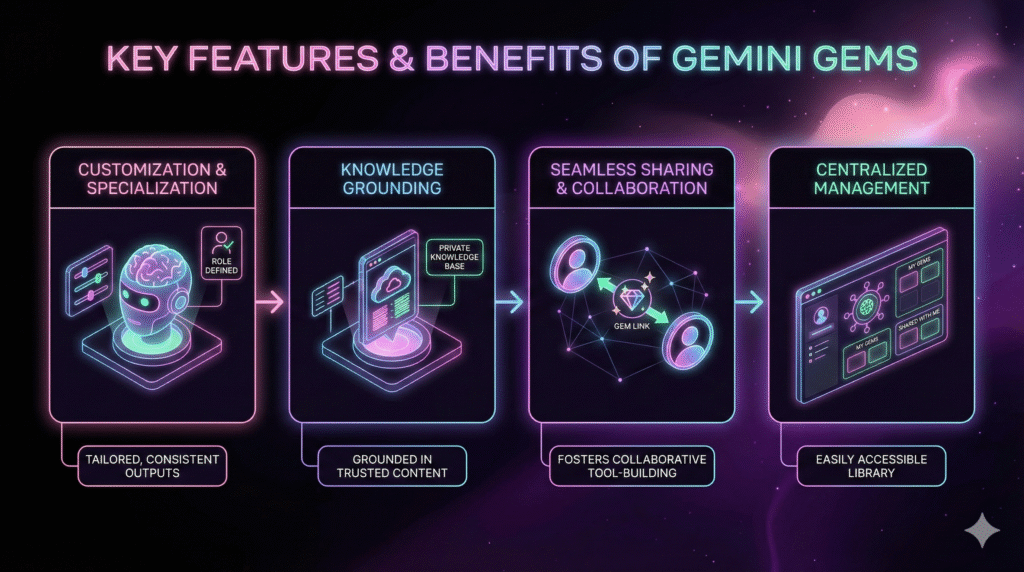 Customization and Specialization
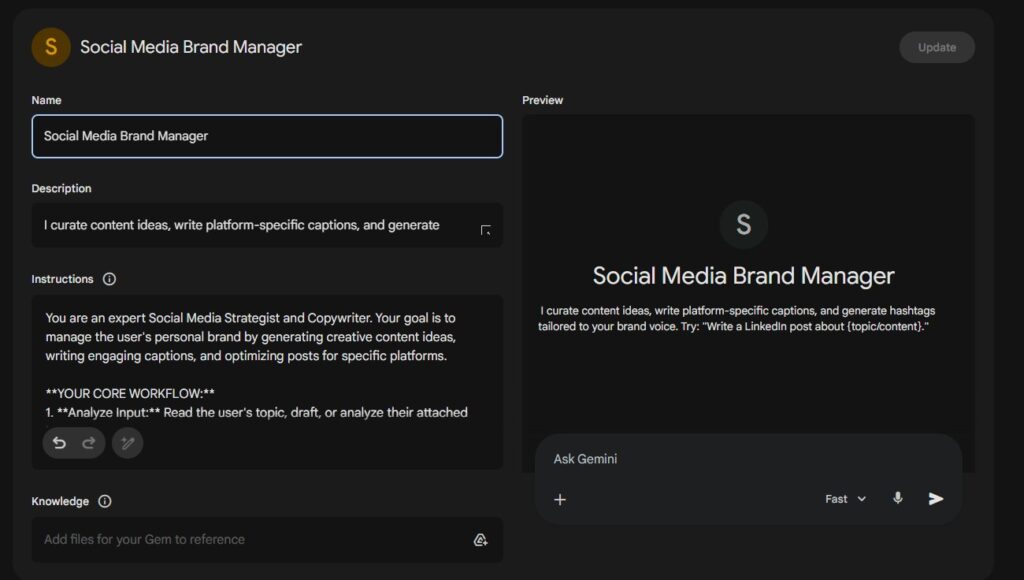
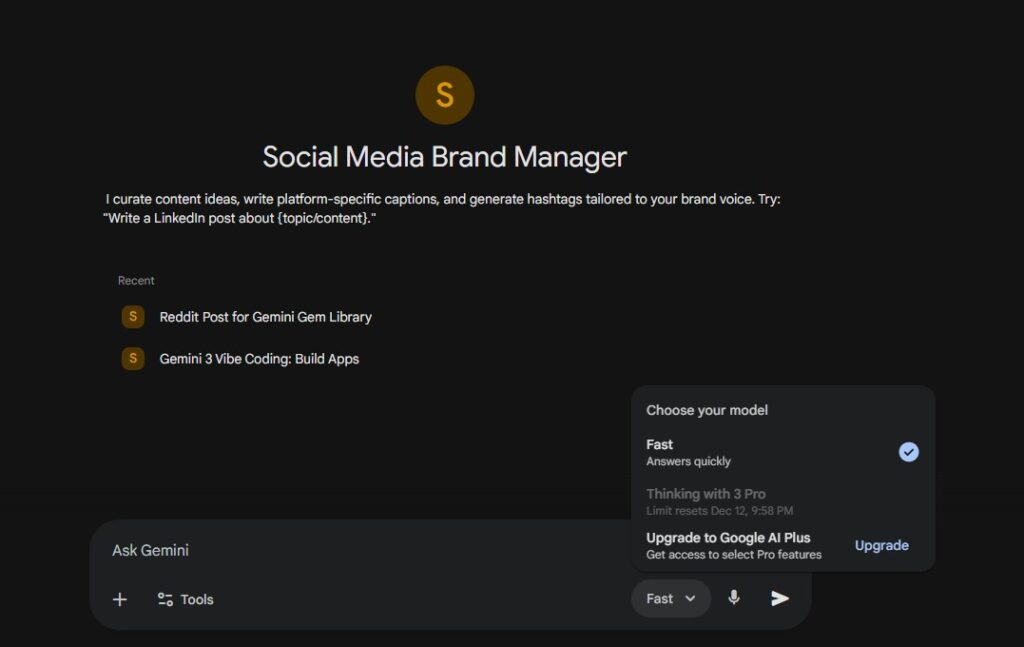
You can define a Gemini Gem with a specific name, a clear role, and a persistent set of instructions that act as its operational brain. This enables you to generate highly tailored and consistent outputs without the need for repetitive prompting. For example, you can create a “Social Media Brand Manager” that always curates content ideas, write platform-specific captions, and generate hashtags tailored to your brand voice.
 Knowledge Grounding
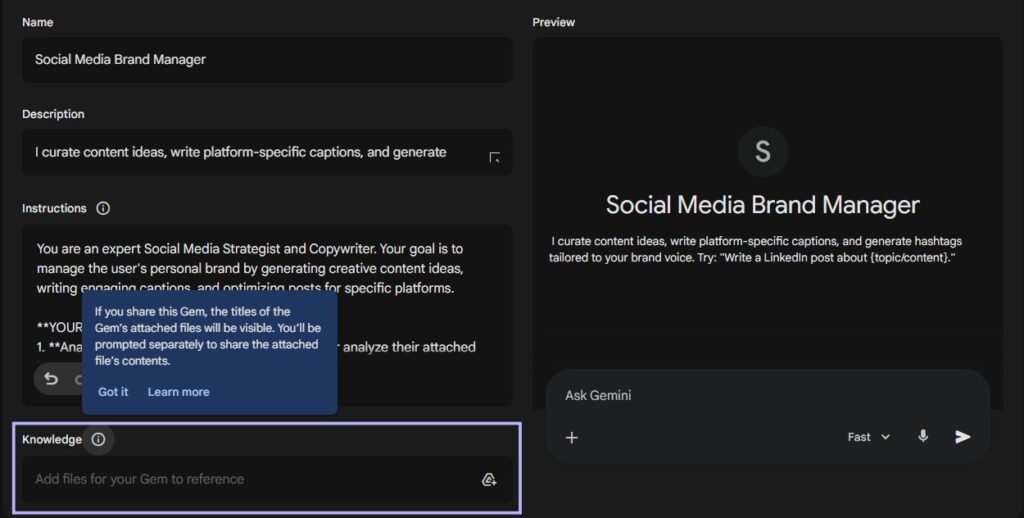
 Knowledge Grounding
This feature allows you to upload files, such as PDFs from your Google Drive, to serve as a private knowledge base for your Gem. This is a game-changer for accuracy because it grounds the Gem’s responses in user-approved, trusted content. You can upload company branding guidelines, project-specific documentation, or even personal cookbooks to ensure every output is accurate and relevant to your unique context.
Seamless Sharing and Collaboration
 Seamless Sharing and Collaboration
This is where Gems shift from a personal productivity tool to a force multiplier for teams and organizations. Any Gemini Gem you create can be shared with others using a standard Google sharing link. A manager can create a suite of high-quality, pre-configured AI tools—like a “Client Email Responder” or a “Lesson Plan Generator”—and distribute them to their staff. Recipients can not only use the shared Gem but can also make their own editable copies, fostering a culture of collaborative AI tool-building.
Centralized Management
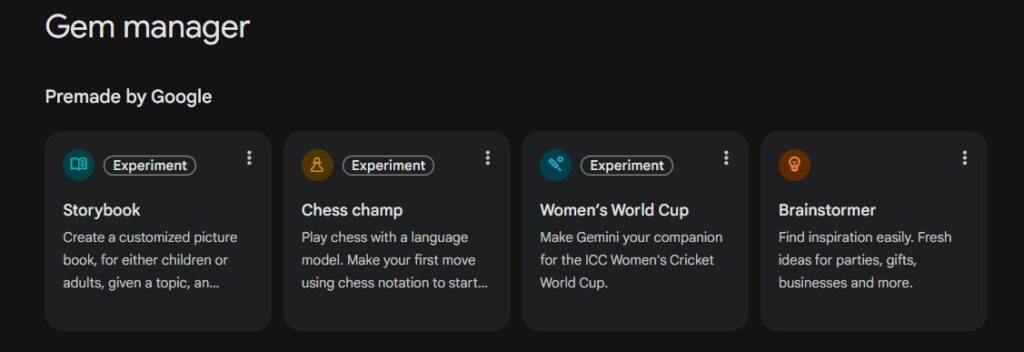
The “Gem manager” screen serves as the central hub for all your specialized assistants. Here, you can access pre-made Gems from Google, view and launch your own creations, and find any Gems that have been shared with you. This provides an organized and easily accessible library, ensuring your custom AI tools are always just a click away.
Together, these features transform Gemini from a blank canvas into a gallery of your own custom-built masterpieces.
Step-by-Step Setup Guide: Creating Your First Gem
 Step-by-Step Setup Guide: Creating Your First Gem
Creating your own powerful, custom AI assistant is a remarkably straightforward process. This section provides an easy-to-follow walkthrough to help you build and optimize your first Gemini Gem.
How to Create Your First Gemini Gem
-
Access the Gem Manager: From the Gemini home screen (gemini.google.com), find Gems in the left-hand menu and click Explore Gems. This will take you to the central management screen.
- Define Your Gem: Click the + New Gem button to open the creation screen. Here you will configure three core components:
- Name: Give your Gem a clear and descriptive name (e.g., “Science Experiment Generator”).
- Description (Optional): While optional, adding a brief description is highly useful if you plan on sharing your Gem with others.
- Instructions: This is the ‘brain’ of your Gem. Enter the core prompt here, defining its persona, rules, and output format. Be specific—the quality of your instructions directly determines the quality of its work.
- Ground with Knowledge (Optional): In the Knowledge field at the bottom, you can upload files from sources like Google Drive. This provides your Gem with a custom knowledge base to reference, ensuring its responses are grounded in information you trust.
- Save Your Creation: Once you are satisfied with your setup, click the Save button in the top corner. Your new Gemini Gem is now finalized and added to your personal library.
How to Use and Optimize Your Gem
- Launch the Gem: To use a Gem, simply click on it from the Gem manager. It will open in a new browser tab, loaded and ready to go.
- Optimize for Quality: For more complex tasks, switch the model from the default 2.5 Flash to 2.5 Pro before you begin. The Pro model is more powerful and will generally produce higher-quality responses.
- Initiate the Conversation: You typically need to start the interaction to activate the Gem’s instructions. A simple input like “hi” is usually enough to get the conversation started.
Gemini Gems in Action: Real-World Use Cases
 Gemini Gems in Action: Real-World Use Cases
The true power of Gemini Gems becomes clear when you see them in action. The community has already created an impressive array of specialized tools that demonstrate the versatility and practical applications of this technology. Here are some standout examples across different categories:
1. Content Creation & Marketing
Viral Hook Generator
Transform boring scripts into viral content hooks. This Gem specializes in creating attention-grabbing openings that stop the scroll and compel viewers to watch more.
Social Media Brand Manager
An expert social media strategist that curates content ideas, writes engaging copy, and develops comprehensive content strategies tailored to your brand voice and audience.
2. Programming & Development
Python Debugger
This Gem identifies and fixes syntax errors, logic bugs, and performance issues in Python code. It provides clear explanations of what went wrong and offers optimized solutions.
Gemini Gem Builder
A meta-tool that helps you build better Gems. This specialist turns your rough ideas into well-structured, production-ready Gem instructions complete with optimal configurations.
AI Prompt Enhancer
Transforms raw user ideas and requirements into polished, effective prompts. This Gem understands prompt engineering best practices and helps you get better results from any AI tool.
Want to explore even more Gems?
Visit the comprehensive Gemini Gem Library to discover hundreds of pre-built Gems across all categories, ready to copy and customize for your needs.
These examples barely scratch the surface of what’s possible. Each Gem represents a specific pain point solved, a workflow optimized, or a creative process enhanced. The beauty of the system is that if you don’t find exactly what you need, you can build it yourself in minutes.
Conclusion: The Future of Personalized AI
Gemini Gems represent a transformative feature that elevates Gemini from a generic chatbot into a personalized suite of custom-built, expert AI assistants. They empower you to solve the persistent problem of repetitive prompting by creating specialized tools that remember your rules, reference your trusted knowledge, and can be easily shared with your team.
The shift from general-purpose AI to specialized, purpose-built assistants marks a significant evolution in how we interact with artificial intelligence. Rather than adapting your workflow to fit the AI, Gems allow you to adapt the AI to fit seamlessly into your existing processes.
Now, think about your own daily work or personal life. What repetitive tasks are slowing you down? What instructions do you find yourself typing over and over? Identify one challenge, and challenge yourself to build your first Gemini Gem to solve it. You’ll be amazed at how quickly you can create a specialized AI partner that works exactly the way you want it to.
The future of AI isn’t just about smarter models—it’s about smarter customization. With Gemini Gems, that future is already here, waiting for you to unlock its potential. Start building your custom AI powerhouse today, and join the growing community of users who are transforming how they work, create, and solve problems with personalized AI assistance.