For most of the past year, a good Claude Code setup meant more of everything: a longer CLAUDE.md, more allow rules, more custom hooks that asked before each step, and a human watching every permission prompt. On November 12, 2026, Lydia Hallie from the Claude Code team at Anthropic gave a talk at AI Engineer called “Rethinking Claude Code Best Practices” with the opposite message: most of what people added to their setups is now holding the Claude 5.5 models back.
The argument is easiest to use as a list of jobs. In a typical session you did five things yourself: you steered the model, approved its tool calls, said no to dangerous ones, checked that the work was really finished, and started every session by hand. Each of those jobs now has a mechanism that does it better than a tired human, and each comes with a specific setting. Anthropic has said its own merged code changes rose from about 2,500 a day in May to more than 30,000 a day in September, and that volume only works if people stop doing these jobs one prompt at a time.
| Job | What you used to do | What handles it now | Setting to change |
|---|---|---|---|
| Steering | Long, emphatic CLAUDE.md files | The model reading your code | Trim CLAUDE.md to facts the code can’t show |
| Approving | Click yes on every tool call | Auto mode classifier | permissions.defaultMode: "auto" |
| Saying no | Hope you catch the bad prompt | Deny rules plus the OS sandbox | permissions.deny, sandbox.enabled |
| Checking | Read the diff and rerun tests | Stop hook that exits 2, then CI | hooks.Stop |
| Starting sessions | Open a terminal and babysit | Headless and cloud runs ending in a PR | claude -p --permission-mode auto |
1.Steering: Let the Model Read the Code
Steering is everything you tell Claude about how your project works: where the tests live, which framework you use, what style to follow, what never to touch. A year ago this belonged in CLAUDE.md because the models missed it otherwise. Current models open the files, read the package manifest, look at existing tests and infer most conventions on their own, which is the core of Hallie’s point about setups holding the models back.
The cost of over-steering is real and easy to miss. CLAUDE.md is loaded into every session, so each line spends context on every turn. Emphatic instructions written for older models, such as “ALWAYS run the linter” or “NEVER create new files”, are also read literally by stronger models: they over-apply the rule in places where it makes no sense and add extra tool calls to prove compliance. Copied documentation is the worst case, because the model can read the real file whenever it needs it.
The practical change is an audit. Paste this prompt into Claude Code in your repository and let it compare the file against the code itself:
What survives is usually short. A trimmed file for a typical web app looks like this, and each line exists because the code alone would mislead the model:
# Build and test
- Run tests with `pnpm test:unit`; `pnpm test` also starts the slow e2e suite.

# Conventions the code does not show
- Money values are integer cents, never floats, even where old code uses floats.

# Off limits
- Do not edit files under /generated; they are rebuilt from the schema.
You know the trim worked when the next few tasks go the same way they did before. Run normal work for a day and watch for one thing: did Claude make a mistake that a deleted line would have prevented? If it did, add that single line back. If it found the convention by reading the files, the line was never pulling its weight.
2.Approving: Hand Routine Calls to Auto Mode
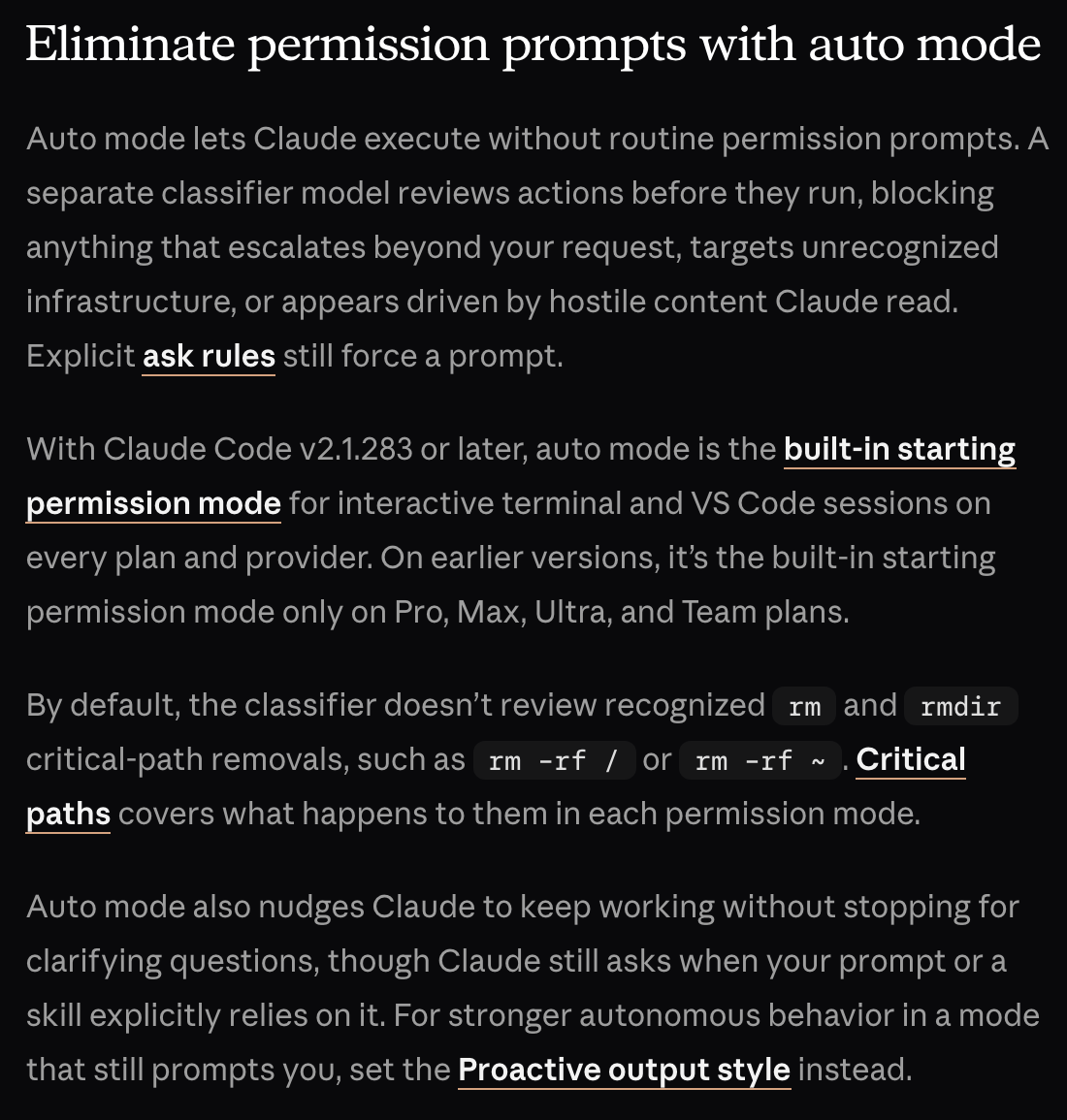
Approving is the job of reading each permission prompt and clicking yes. Auto mode replaces it with a separate classifier model that reviews each action before it runs. Reads and file edits inside your working directory are approved without review; shell commands, network calls and other actions go to the classifier, which blocks the risky ones and lets routine work through. The classifier sees your messages, the tool calls and your CLAUDE.md, but tool results are stripped from its input, so hostile text inside a file or web page can’t talk it into approving something.
The reason to switch is that humans are bad at this job after the first few prompts. In material Anthropic published in August, testers were shown a routine stream of permission prompts with a dangerous command planted in it; people caught it 13.6% of the time, while auto mode caught 89%. Those are vendor-reported numbers, and the permission modes documentation is explicit that auto mode “reduces permission prompts but does not guarantee safety”. The point is the comparison: the click-yes habit was never the safety layer people assumed it was.
On Claude Code v2.1.283 and later, auto is already the starting mode for interactive terminal and VS Code sessions. To make it explicit, set it in your user settings file. It has to be the user-level ~/.claude/settings.json; the same key in a project’s .claude/settings.json does not take effect:
{
  "permissions": {
    "defaultMode": "auto"
  }
}
When auto mode starts, it drops broad allow rules that would grant arbitrary code execution, such as `Bash() or Bash(python), and keeps narrow ones like Bash(npm test). By default it blocks downloading and executing code (curl | bash`), force pushes, production deploys and migrations, mass deletion in cloud storage, destroying files that existed before the session, and sending sensitive data to outside endpoints.
The check is the fallback behavior. If the classifier blocks an action three times in a row or twenty times in a session, auto mode pauses and Claude Code goes back to prompting you; approving that prompt resumes auto mode. If you hit the fallback often, the task is asking for something risky and should be split, or a narrow allow rule is missing. If routine edits and test runs no longer interrupt you, the switch worked.
3.Saying No: Deny Rules and the Sandbox
Saying no used to mean noticing the one bad prompt among fifty good ones. Now it belongs to two mechanisms that don’t depend on attention. Deny rules are checked first, before ask and allow rules and before the classifier ever sees the call, and the documentation states that they “block in every mode, including bypassPermissions“. The sandbox goes one level lower: the operating system itself limits which files a command can write and which hosts it can reach, including child processes.
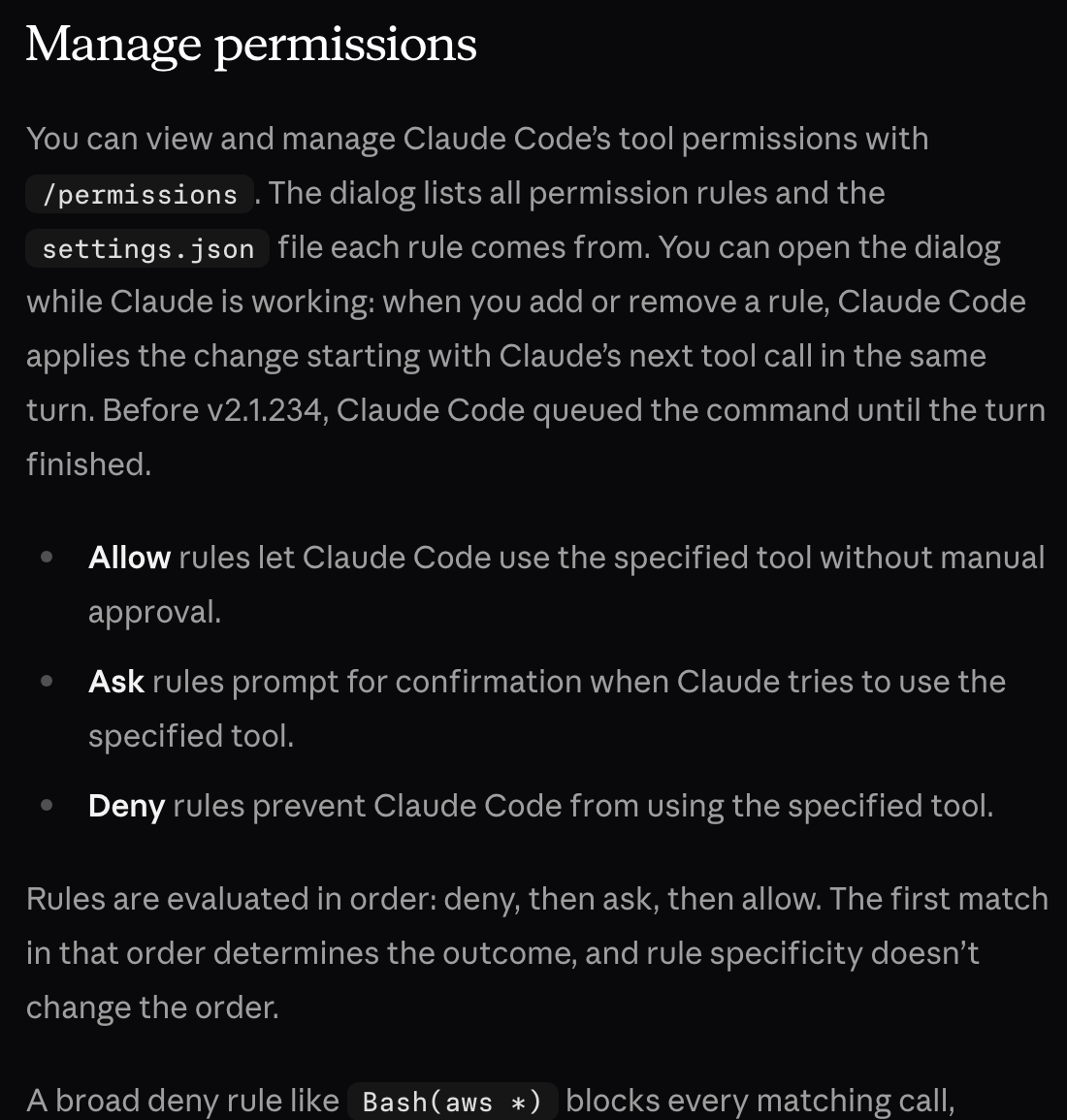
This is the layer for anything you can’t undo. The classifier is a probability; a deny rule is a fixed answer. Precedence is strict: per the permissions documentation, rules are evaluated as deny, then ask, then allow, and an allow rule can’t carve an exception out of a deny rule. A deny on `Bash(git push –force ) wins even if some other file allows Bash(git push ). Deny rules also match a command nested in a subshell, a $(…)` substitution or a loop body, and they match past a leading environment variable assignment.
Start with the files and commands whose damage is permanent. This block denies reads of secrets, force pushes, hard resets and a production deploy script, then turns on the sandbox with an empty network list plus the one registry the project needs:
{
  "permissions": {
    "deny": [
      "Read(./.env)",
      "Read(./.env.*)",
      "Read(./secrets/**)",
      "Bash(git push --force *)",
      "Bash(git reset --hard *)",
      "Bash(./scripts/deploy-prod.sh *)"
    ]
  },
  "sandbox": {
    "enabled": true,
    "failIfUnavailable": true,
    "filesystem": {
      "denyRead": ["~/.ssh", "~/.aws/credentials"]
    },
    "network": {
      "allowedDomains": ["registry.npmjs.org"]
    }
  }
}
The two halves cover each other’s gaps. A Read(./.env) deny blocks Claude’s file tools and recognized commands such as cat and sed, and it also blocks Edit and Write on that path. It does not stop a Python or Node script that opens the file itself, and Bash rules match the command text rather than the program, so sh -c or a full path can slip past them. The sandbox closes that hole at the OS level. It runs on macOS, Linux and WSL2 (Linux needs bubblewrap and socat); failIfUnavailable makes Claude Code exit instead of quietly running commands unsandboxed. A .claudeignore file has no effect, so move its entries into Read deny rules.
Test it the same way an accident would happen. Ask Claude to print the .env file and to force push a branch; both should be refused with a message naming the rule. Then ask it to run a one-line Python script that reads ~/.ssh/id_rsa; under the sandbox the read fails. If any of the three succeeds, the rule is in the wrong settings file or the sandbox did not start.
4.Checking It’s Done: Tests, Stop Hooks and CI
Checking used to mean reading the diff, running the tests yourself and finding out that “done” meant “mostly done”. The replacement is a check that runs automatically at the moment Claude tries to finish. A Stop hook fires when Claude ends its turn; if the hook exits with code 2, Claude Code keeps the session going and feeds the hook’s error output back, so Claude sees exactly what failed and continues working.
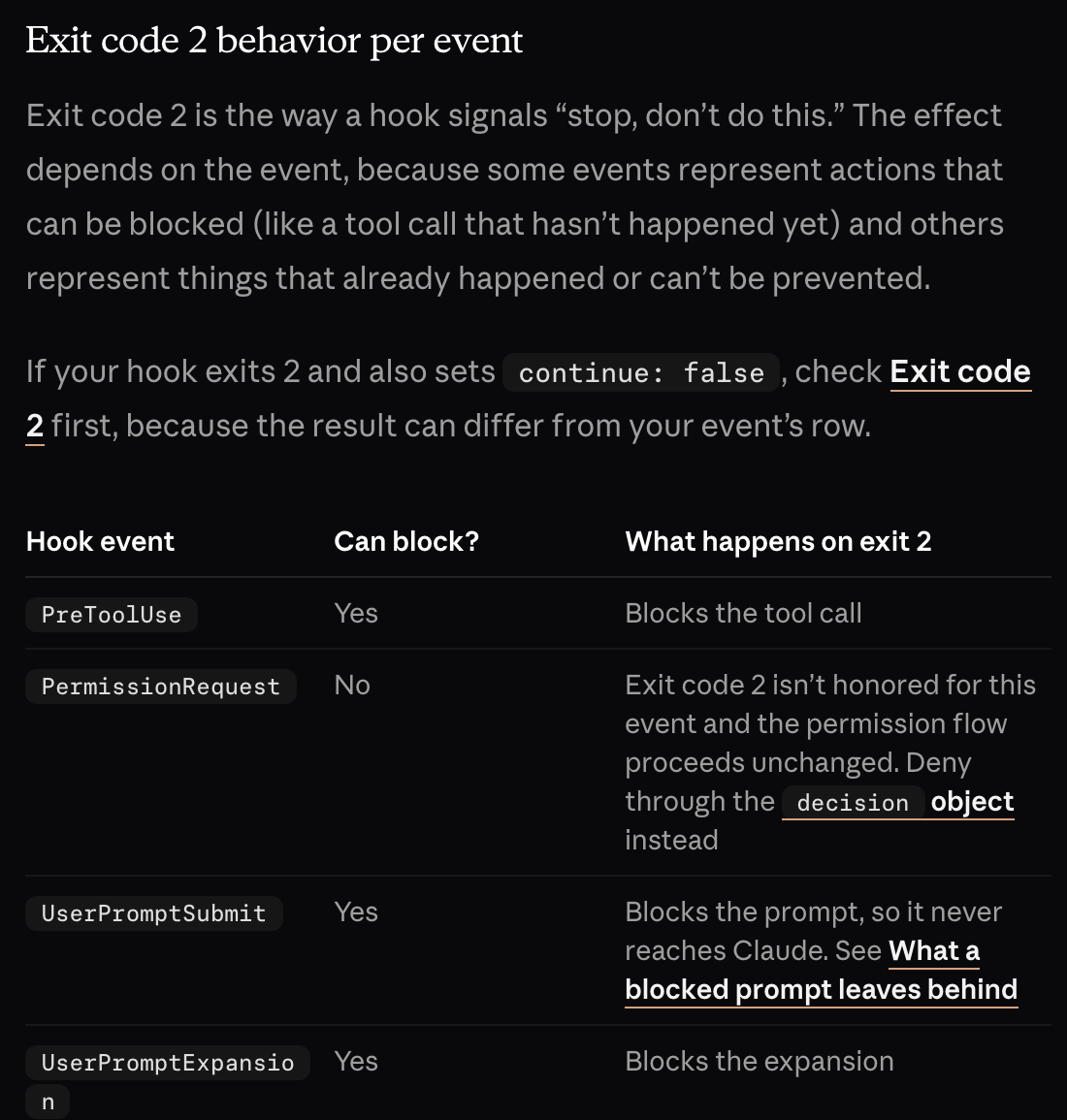
The exit code is the detail people get wrong, and the hooks reference spells it out. Exit 0 means success. Exit 2 is the blocking code. Any other non-zero code, including the conventional exit 1, is treated as a non-blocking error: the action goes ahead and Claude stops anyway. A hook that runs your tests and exits 1 on failure looks correct and does nothing.
Start by putting the definition of done in the prompt, such as “done means pnpm test:unit passes and the new endpoint has a test”. Then enforce it with a script. This one runs the unit tests, sends Claude back with the last lines of output on failure, and uses the stop_hook_active field to avoid looping forever when Claude is already continuing because of this hook:
#!/usr/bin/env bash
# .claude/hooks/check-done.sh
input=$(cat)
if [ "$(echo "$input" | jq -r '.stop_hook_active')" = "true" ]; then
  exit 0
fi
if ! out=$(pnpm test:unit 2>&1); then
  echo "Tests are failing. Fix them before finishing:" >&2
  echo "$out" | tail -40 >&2
  exit 2
fi
exit 0
The guard means the hook sends Claude back once and then lets the turn end even if tests still fail, which keeps a broken environment from trapping the session. Remove the guard if you want Claude to keep trying; Claude Code still caps stop-hook continuations at eight in a row. Register the script in .claude/settings.json. Stop hooks take no matcher, so the entry is short:
{
  "hooks": {
    "Stop": [
      {
        "hooks": [
          { "type": "command", "command": "${CLAUDE_PROJECT_DIR}/.claude/hooks/check-done.sh" }
        ]
      }
    ]
  }
}
The last layer is CI. Run the same test command on every pull request, so work from any session, local or cloud, meets the same bar before a human reviews it. To check the hook, break one unit test on purpose and ask Claude to make an unrelated small change. The turn should not end on the first try: you should see the test output arrive and Claude fix the failing test before it stops.
5.Starting Sessions: Run Work Unattended
The fifth job was opening a terminal, starting a session and staying nearby to answer prompts. With approvals, deny rules and checks automated, a session no longer needs you there, so it can start from a script, a scheduled job or a cloud session and finish by opening a pull request. This is the order that matters: once the walls and checks exist, running several sessions side by side stops being a risk you have to watch.
The trap is that headless runs start differently. Interactive sessions start in auto mode on current versions, but claude -p and Agent SDK runs start in Manual mode unless you pass a mode. In Manual mode an unattended run that hits a prompt has no one to answer it. With auto mode in a -p run, a blocked action simply doesn’t run and Claude keeps working; the run isn’t stopped, so the result can quietly be missing a step.
Pass the mode explicitly and ask for a pull request as the deliverable, so the output lands where CI and a reviewer will see it:
claude -p "Fix the flaky date test in src/billing. Done means pnpm test:unit passes. Open a pull request with the change." --permission-mode autoKeep the deny rules and the sandbox in your user settings (or managed settings for a team) rather than only in the project, so every unattended run inherits them. If an unattended run must never wait on a prompt, permissions.denyInsteadOfPrompting set to true turns any prompt into a denial while keeping your chosen mode.
The check is the artifact the run leaves behind. A good unattended session ends with a pull request, a green or red CI result and a summary of what was skipped. If you find a run that finished with no PR and no explanation, read its transcript for blocked actions: that is where the missing step went.
6.What to Keep From Your Old Setup
Not everything you built is dead weight. The useful test for any existing rule, hook or CLAUDE.md line is whether the action it guards can be undone. Deleting a production table, force pushing over a teammate’s work, leaking a key or deploying broken code can’t be taken back, so those get hard deny rules, sandbox limits and a Stop hook that blocks. A wrong variable name, an unusual file layout or a style choice can be fixed in the next commit, so those are better left to the model and the tests.
Apply that test to your current setup this week: trim CLAUDE.md, switch the default mode, write the deny list for the irreversible actions, fix any hook that exits 1, and give headless runs an explicit mode. The setup gets shorter, and the parts that remain are the ones that actually protect you.