
Wan 3.0 is Alibaba’s newest video model, and two months after launch it is back in the conversation for one reason: price. Creators running the same prompt through Wan 3.0 and ByteDance’s Seedance 2.5 keep reporting that Wan costs roughly half as much per clip.
Price is only part of the story. Wan 3.0 also makes 30-second clips with sound in one pass, and it can turn a slide deck, a spreadsheet or a web page into a video, which few other models accept as input.
This guide covers what Wan 3.0 is, where you can use it, what Alibaba charges, what the viral cost tests actually show, and how to run its two most useful jobs: document-to-video and reference-driven shots. Facts come from Alibaba’s model documentation and pricing pages as checked on October 22, 2026. We have not generated our own clips with it, so quality and cost claims from other creators are attributed to them.
In this article
1.What Wan 3.0 Is
Wan 3.0 is a video generation model from Alibaba’s Tongyi Wan team. It entered a public beta on August 6, 2026 and rolled out fully on August 24, the day after Alibaba announced a roughly $10 billion share sale to fund its AI spending. Alibaba counts it as the eighth version of the Wan line since Wan 1.0.
The most important difference from earlier versions is not visible in a clip: Wan 3.0 is not open source. Wan 2.1 and 2.2 were released with downloadable weights and became popular for running video generation on your own hardware. The open-source list on Alibaba’s Wan site still ends at Wan 2.2. Wan 3.0 runs only on Alibaba’s servers and the partner platforms that resell it.
What the model does, according to Alibaba’s documentation:
- One model for every job. The same model handles text-to-video, image-to-video, reference-driven generation, document-to-video, video editing and video extension. It works out which job you want from the files you attach and the wording of your prompt.
- Up to 30 seconds per generation, at 480p, 720p or 1080p, 30 frames per second, with an automatic “smart duration” option that picks a length from the prompt.
- Sound in the same pass. Audio, including dialogue, is generated with the picture and is on by default.
- Up to 20 reference materials per request: images, short videos, audio clips, or one document or web page.
There are two versions. The standard model, wan3.0-video, is the one most people use. wan3.0-video-prime is a premium version that costs about 40% more per second. Alibaba’s API documentation does not spell out the quality difference between them, so treat Prime as an option to test, not an automatic upgrade.
Alibaba’s own launch claims are typical of a new model, and its one third-party ranking is from its own account: on September 18 it posted that Wan 3.0 ranked second in the Overall Video category on OpenArt Arena, a community comparison site.
2.Where You Can Use It
There are three routes to Wan 3.0, and which one fits depends on whether you want to click or write code.
Wan Create is Alibaba’s own web app at create.wan.video, with matching iOS and Android apps. It works on credits and is the easiest way to try the model. The creation box combines a prompt with attached media, and a row of modes underneath covers the main jobs: Reference to Video, First & Last Frame, Video Edit, Image Generation and an Agent mode.
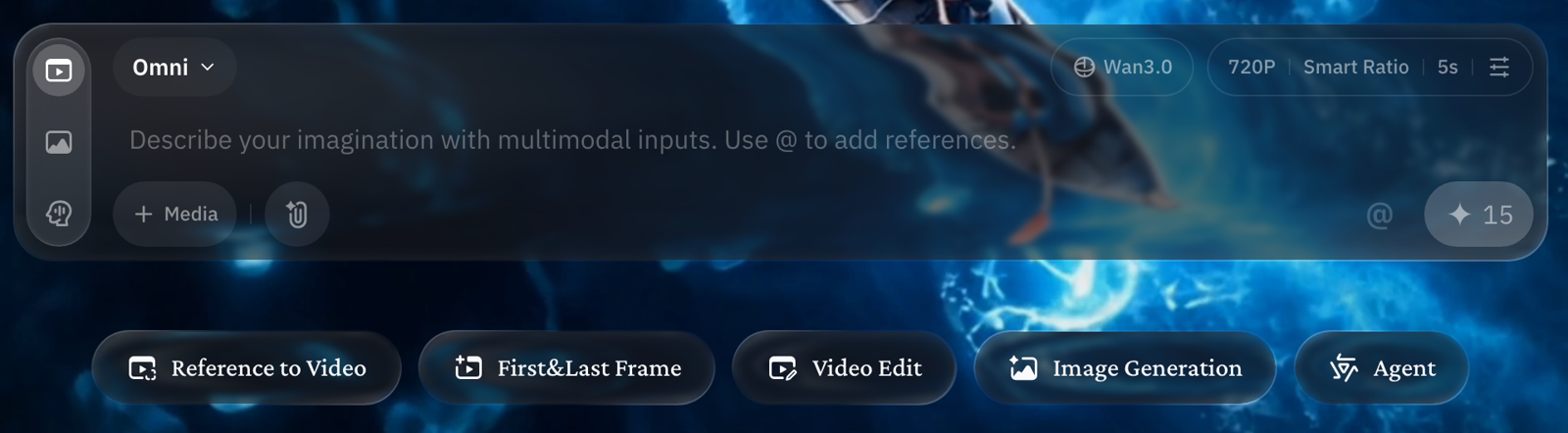
The default settings are Omni mode, Wan 3.0, 720p, a smart aspect ratio and 5 seconds, which the interface prices at 15 credits before you sign in. As with any credit app, the cost changes as you raise the length and resolution, and the app shows the new total before you press generate.
Alibaba Cloud Model Studio is the developer route. You call the model through an API with your own key and pay per second of video. This is where the published per-second prices below apply, and it is the only route with full control over every parameter.
Third-party platforms such as Higgsfield and Pika also offer Wan 3.0, often bundled with competing models so you can compare them in one place. They set their own prices and promotions. Pika, for example, advertised Wan 3.0 at up to 35% less than competitors on its API plan at launch.
If you want to see what the model does before spending anything, start in Wan Create. If you plan to generate at volume or build it into a product, go to Model Studio, where the price per second is published and predictable.
3.What It Costs
On Model Studio, Wan 3.0 is billed by the second of video it outputs. The rates depend on the version, the resolution and the region your account uses. The pricing page lists these Singapore-region rates, which are the ones most international accounts see:
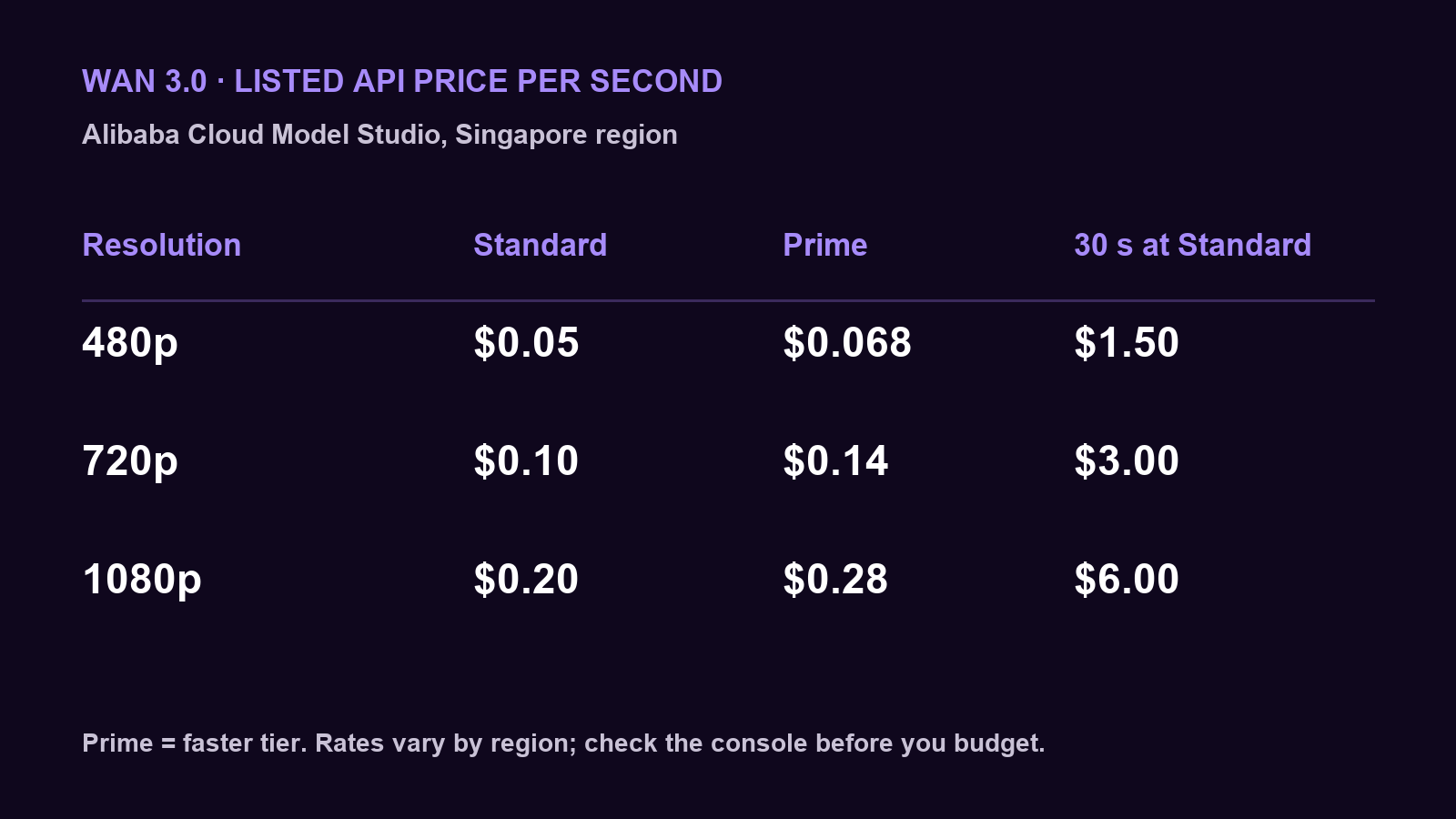
The card shows the standard and Prime rates side by side, plus the cost of a full 30-second clip on the standard model. Alibaba’s pricing page currently marks the standard rates as a limited-time 30% discount, so expect them to rise when the promotion ends.
Three details change the real cost:
- Region. Accounts in the US (Virginia) and mainland China regions pay less: about $0.041, $0.083 and $0.165 per second for the standard model at 480p, 720p and 1080p. Your API key, endpoint and model must all be in the same region, so you cannot mix a cheaper region with a key from another.
- Input video is billed too. When you upload a video to edit or extend, Alibaba bills its length as well as the output. Failed requests are not billed.
- A small free quota. New Singapore-region accounts get 30 seconds of free generation, counting input and output video together, valid for 90 days.
Here is how that works out. A 10-second 720p draft on the standard model costs $1.00 in Singapore. The same clip at 1080p costs $2.00. A full 30-second 1080p clip costs $6.00 on the standard model and $8.40 on Prime. If you extend an existing 10-second clip by 15 seconds, you pay for 25 seconds, not 15.
To budget a project, decide your delivery resolution first, multiply the total seconds you expect to generate, including retries, by that rate, and add the length of any video you plan to upload.
4.What This Week’s Cost Tests Show
The renewed attention on Wan 3.0 comes from creators running the same prompt through Wan 3.0 and Seedance 2.5 and posting the bills. The most-shared test, from the creator @maxxmalist on October 21, put the two clips side by side: $3.47 for Seedance 2.5 against $1.38 for Wan 3.0, with the creator judging Wan’s version the more realistic one.
another example…
left video: seedance 2.5 0 – $3.47
right video: wan 3.0 – $1.38more than 2x cheaper and it actually looks more realistic https://t.co/vqSLEuPyab pic.twitter.com/vWJ3Udk3Jj
— MAX (@maxxmalist) October 21, 2026
A second creator, @jacobrodri_, ran a different job, an AI influencer clip, a day earlier and reported $1.44 for Seedance 2.5 against $0.80 for Wan 3.0.
Read those numbers carefully. Neither creator says which platform they generated on, and per-clip prices vary by platform, plan, resolution and length. What the two tests agree on is the ratio: Wan 3.0 cost around 40 to 60% of what Seedance 2.5 cost for the same job. That ratio is more useful than either dollar figure, which you should not expect to match your own bill.
There is also a reason so many of these tests appeared at once. On October 13, Higgsfield, a platform that sells access to both models, made Wan 3.0 unlimited for seven days and cut its API price by 60%. Many comparison posts in the following week were made on that promotion, and several came from Higgsfield itself. That does not make the results wrong, but it does mean the volume of posts reflects a sale as much as a verdict.
“More realistic” is the part to test yourself. Quality judgments in these posts are one person’s taste on one prompt. Run a prompt from your own work through both models at the same length and resolution, and compare the result and the cost on your own account.
5.Turn a Document Into a Video
Document-to-video is the job that sets Wan 3.0 apart. You attach one file or one public web page, and the model reads it and turns its content into a video, with narration and visuals drawn from what the document says.
Alibaba lists the uses it has in mind: a product slide deck becomes a brand film, a training deck becomes a short lesson, spreadsheet data becomes an animated chart, and a business report becomes a narrated briefing. The API accepts Word, Excel, PowerPoint, PDF, plain text and Markdown files, and Alibaba’s launch announcement also lists Apple’s Keynote, Pages and Numbers formats. Each request takes one file or one link, not both, up to 100 MB and 50 pages.
In Wan Create, attach the file in the creation box and describe the video you want. Through the API, the file is passed as a single media item of type file, with a public URL Alibaba’s servers can download. This request, based on the example in Alibaba’s guide, asks for a 30-second 720p video from a slide deck:
{
  "model": "wan3.0-video",
  "input": {
    "prompt": "A 30-second product launch film based on the attached deck. Open on the product, then show its three main features in the order of the slides, with a calm female voiceover in English. Minimal, bright studio style.",
    "media": [
      { "type": "file", "url": "https://example.com/your-deck.pptx" }
    ]
  },
  "parameters": {
    "resolution": "720P",
    "ratio": "adaptive",
    "duration": 30,
    "prompt_extend": true
  }
}
The request goes to Model Studio’s video synthesis endpoint as an asynchronous job: you send it with your API key and the X-DashScope-Async: enable header, get back a task ID, and then check the task until the video URL appears. The prompt_extend setting lets the model expand your prompt, and ratio set to adaptive lets it choose the frame shape.
Two practical rules make this work. The document must be reachable without a login, so a private share link will fail. And the prompt should say what kind of video you want and how to use the document, because the model decides structure from both.
You know it worked when the video follows the document’s order and uses its facts. Check any numbers, names and on-screen text against the source, since Alibaba itself says text rendering is still being improved.
6.Direct a Shot With References, Frames and Edits
Beyond documents, Wan 3.0 accepts three kinds of control input, and each request can use only one kind. Choosing the right one, and staying inside its limits, decides whether a request runs or is rejected.
Reference materials keep characters, objects, places and voices consistent. A request can include up to 10 images, up to 5 videos with a combined length of 15 seconds, and up to 5 audio clips with a combined length of 15 seconds. In the prompt you refer to them by type and order: “Image 1”, “Video 1”, “Audio 1”. Alibaba’s own example prompt reads like a stage direction, telling the character in Video 1 to hold the object in Image 3 while sitting on the chair in Image 4.
First and last frames pin how a clip starts, and optionally how it ends, with one image each. These cannot be combined with reference materials or documents in the same request, so you choose between controlling the endpoints and controlling the cast.
Editing and extension start from an existing video. Attach the video and use clear verbs in the prompt: “edit”, “remove”, “replace” or “change to” for an edit, “extend” or “continue” for an extension. The input and output together cannot exceed 30 seconds, and the uploaded video’s length is billed.
Here is how a reference budget might look for a 10-second product ad with a presenter. You attach a photo of the presenter as Image 1, two product photos as Images 2 and 3, a 6-second clip of the camera move you want as Video 1, and an 8-second voice sample as Audio 1. That uses 3 of 10 image slots, 6 of 15 video seconds and 8 of 15 audio seconds. The prompt then directs the scene:
For longer clips, Alibaba’s guide recommends describing multiple shots of 4 to 6 seconds each with timestamps, rather than one long paragraph. That gives the model clear cut points across a 30-second take.
The shot is set up correctly when the request runs without a validation error and the presenter, product and voice match their references from the first frame to the last. If a detail drifts, tighten the prompt’s references before adding more material.
7.Limits, and Whether to Use It
Wan 3.0 has clear weaknesses, and Alibaba names two of them itself: audio texture and the accuracy of on-screen text are still being improved. If your video depends on a readable product label, a price on screen or a polished soundtrack, plan to fix those in an editor.
Several practical limits catch API users:
- Results expire. The video URL Model Studio returns is valid for 24 hours. Download every result promptly or it is gone.
- Regions do not mix. Your key, endpoint and model must be in the same region.
- One control mode per request. References, documents and first/last frames cannot be combined.
- No self-hosting. With closed weights, you cannot run Wan 3.0 on your own hardware or fine-tune it, which was the main appeal of Wan 2.2 for many developers.
The decision comes down to the job:
- Choose Wan 3.0 for high-volume social video, product and UGC-style ads, and drafts, where its per-second price is the deciding factor and 720p or 1080p is enough.
- Choose it for documents when you need to turn decks, reports or web pages into short explainers. Few competing models accept those inputs directly.
- Test Prime only on shots where the standard model falls short, since it costs about 40% more.
- Stay on Wan 2.2 if you need open weights to run locally or fine-tune.
- Look elsewhere when clean on-screen text or broadcast-quality sound matters more than cost.
The fairest test is the one the creators online ran, done on your own work. Pick one prompt you have already used, generate it on Wan 3.0 and on your current model at the same length and resolution, and compare both the result and the bill.