ChatGPT Ads are now open in 89 countries, and more than 100,000 advertisers have already run campaigns since the format launched about eight months ago. For a marketer, that turns ChatGPT from a channel to watch into a channel to test. The catch is that almost nothing from search or social advertising transfers cleanly: there are no keywords, the ad appears only when a separate system decides a conversation deserves one, and several setup choices cannot be undone.
This guide walks through the whole path as of October 21, 2026: how an ad gets chosen inside a conversation, how to check that your business is eligible, and the exact setup in OpenAI’s Ads Manager, from objective and bids to context hints, creative and the measurement pixel. It closes with the few public performance numbers that exist, so you can judge your first two weeks against something real.
In this article
- What ChatGPT Ads Is and Who Sees It
- How ChatGPT Picks an Ad Mid-Conversation
- Check Your Category and Country First
- Create the Ads Manager Account
- Choose the Objective, Bid and Budget
- Write Context Hints That Describe Real Conversations
- Write Ads That Survive Review and Earn the Click
- Install the Pixel and Conversions API
- Read the First Two Weeks of Results
- Who Should Test ChatGPT Ads Now
1.What ChatGPT Ads Is and Who Sees It
ChatGPT Ads are sponsored units that appear below a ChatGPT answer, clearly labeled as sponsored and visually separate from the response. OpenAI says more than 1.2 billion people use ChatGPT each week, but the ad audience is a defined slice of that number. Ads show only on the Free and Go plans. Plus, Pro, Enterprise and every Business plan stay ad-free, and accounts identified as belonging to someone under 18, through account age or age prediction, never see ads.
That audience profile matters before you spend anything. You are reaching adults on free or low-cost tiers who are in the middle of working something out: planning a trip, comparing software, furnishing a room, choosing a gift. OpenAI’s own framing is “moments of consideration”, which is closer to the research phase of a purchase than to the final branded search. Offers that help someone evaluate options tend to fit. Offers that depend on impulse or on a heavily regulated claim tend not to.
Each ad unit is built from six parts: the advertiser name, a favicon used as the logo, a title, a short description, an image and a landing page. ChatGPT also adds a short, model-written introduction above the creative that explains, in a neutral voice, how the ad relates to the conversation. You do not write that line and you cannot edit it, which is why the title and description have to carry the specific value of your offer on their own.
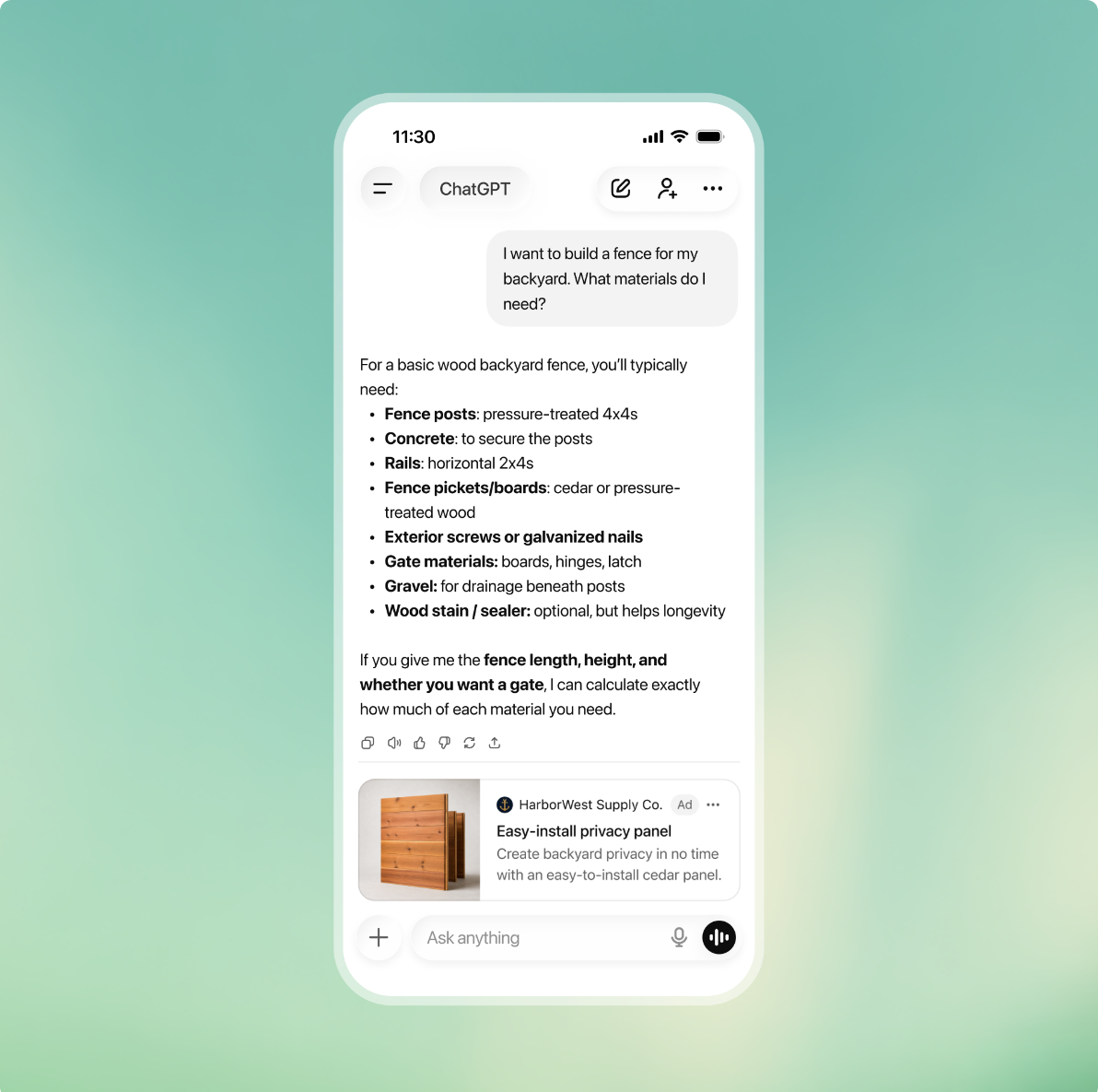
Two privacy rules shape what you can expect back. OpenAI states that conversations stay private from advertisers and that it does not sell user data, so you never see what a person asked. You see aggregate reporting and your own site analytics. Personalization from a user’s wider ChatGPT history applies only when that user has ads personalization turned on.
2.How ChatGPT Picks an Ad Mid-Conversation
ChatGPT does not match ads to a query the way a search engine does. OpenAI’s engineering team describes a separate ads service, with its own models and code, that runs alongside the answer. A custom post-trained model they call the orchestrator follows the conversation, decides whether there is a real commercial need, and calls a chain of tools to find, filter and price candidate ads. Because the answer path does not depend on this service, an ad can never delay or change what ChatGPT says.
This design explains three things that surprise new advertisers. There is nothing to bid on in the keyword sense, because intent is inferred across turns. “No ad” is a normal and successful outcome, so a low impression count can mean the system found no fitting moment rather than that your bid was too low. And an ad can win the auction and still not appear, because ChatGPT never waits for the ad before showing its answer.
The pipeline has six stages, and each one is a place where an ad can drop out. The table below lists them in order with what each checks, so you can trace a weak campaign to the stage most likely holding it back.
| Stage | What the system does | What knocks your ad out |
|---|---|---|
| Intent queries | Rewrites the conversation into one or more short commercial queries, then into semantic embeddings | Your offer does not match any need the conversation actually expresses |
| Retrieval | Approximate-nearest-neighbor search over several ad indices, including a review-aware product-feed index | Thin or vague creative and landing pages that embed poorly |
| Filtering | Checks active status, country targeting, policy, remaining budget, pacing, placement fit and per-advertiser limits | Paused ads, exhausted budget, wrong country, policy flags |
| Scoring | Scores semantic relevance, predicted engagement and historical performance | Generic copy, weak past click-through |
| Auction | Relevance-weighted second-price auction with an admission threshold and quality-adjusted ranking | A bid too low for the quality, or relevance below the bar |
| Final checks | Blocks ads that feel wrong in context and drops any ad that arrives after the answer is ready | Tone mismatch with the conversation, slow delivery |
OpenAI gives a concrete example of the intent step. A user asks what to cover on a two-day Yosemite trip, then whether it will be cold next week, then about a shoe brand’s new product lines. The person never connected the shoes to the trip, but the orchestrator might form two queries, one for hiking-appropriate shoes and one for that brand’s lines suited to travel. Your ad competes on the goal behind several messages, not on the last one.
For your planning, write down the conversation goal your ad answers and where it helps: exploring, comparing or deciding. If you cannot describe a multi-turn conversation that ends with someone needing your product, the orchestrator probably cannot either. That sentence becomes the raw material for the ad groups and context hints you set up later.
3.Check Your Category and Country First
The most expensive mistake in ChatGPT Ads is building a full campaign for a business that cannot run. OpenAI’s ad policies, at version 1.6 from September 2026, restrict categories during this early phase, and self-serve access depends on where the billed legal entity is registered. Both checks take ten minutes and decide whether the rest of this guide applies to you.
On categories, the initial focus is consumer verticals. Everything else is either reviewed case by case in the United States or disallowed for now. The table below groups the main categories by status so you can place your business before opening an account.
| Status | Categories |
|---|---|
| Allowed in the early phase | Household and consumer goods, lifestyle products, local services, travel and entertainment, digital products and education |
| US only, approved case by case | Financial services such as credit cards, insurance and brokerages; health services such as dental, vision and health insurance; licensed legal services |
| Disallowed for now | Dating and adult content, alcohol and tobacco, gambling, political and issue advocacy, recreational drugs, individual job or housing listings, credit repair and debt settlement, unsupported wellness claims |
Two policy details catch otherwise eligible advertisers. Ads must be consistent end to end, so an approved creative cannot send people to a landing page that introduces disallowed content, such as a food delivery ad that lands on an alcohol offer. And ads must not imitate the ChatGPT interface, voice or functionality, so a creative styled like a chat reply is likely to be removed.
On country, OpenAI’s Ads Manager availability page lists the markets where self-serve Ads Manager works, including the United States, the United Kingdom, Canada, Australia, India, Japan, Korea, Vietnam, Brazil, Mexico and most of the European Union. The legal entity that advertises and gets billed must be based in a listed country. Some newer European markets currently start through OpenAI’s sales team or agency partners rather than self-serve sign-up.
There is also a limit for new accounts. Some new self-serve accounts can advertise only in their home country at first, and selecting other countries does not override that. The account becomes eligible for other supported countries once identity verification is approved and it has reached a required level of spend at home. Plan your first test for your own market.
You are clear to continue when three things are true: your category sits in the allowed group or you hold the US licence a restricted category needs, your country shows as Available, and every page a click can reach is free of disallowed content.
4.Create the Ads Manager Account
All self-serve campaigns run in OpenAI Ads Manager, currently labeled Beta, at ads.openai.com. You sign in with an OpenAI account, ideally one tied to a work email, and the advertiser account you create sits on top of that login. One person should create the account and invite everyone else; an agency running several clients needs one advertiser account per client and switches between them with the same login.
Sign-up offers two paths. With the first, you enter your website URL and Ads Manager drafts your first ad and campaign from it during sign-up. With the second, you skip that step and land in an empty Ads Manager. The first path is faster, but it carries a trap: the onboarding notice says the ads will go live once they pass review, and once billing is in place they can start spending. If you take the website path, check the campaign’s status and schedule immediately and pause it if you are not ready.
The advertiser name you type at sign-up fills three separate fields, and they do different jobs. Set each one deliberately in Settings, then General, before your first ad runs, because two of them trigger review later. The list below shows what each controls.
- Account Name: the internal label inside Ads Manager. Changing it never triggers review.
- Brand Name: the public name shown on your ads in ChatGPT. Changing it later triggers brand review and pauses serving until approval.
- Legal Name: the registered business name used for billing and business verification. Changing it restarts business review and may pause serving.
Three settings are permanent from the moment you create the account: country or region, currency and time zone. Currency also sets your minimum budget and the week boundaries used for budget pacing, so pick the currency your business actually bills in rather than accepting a default.
Finish setup before building campaigns. Add a credit card and billing profile, since nothing delivers without them; upload your logo, which appears as the favicon; and invite teammates under Settings, then Users, with one of three roles: Admin for full access, Member to create and manage campaigns, and Viewer for read-only reporting. Give a client or finance contact Viewer, not Member.
Your account is ready when billing shows as complete, verification is approved, and no ad created during sign-up is running before you have chosen its dates. If a later ad shows “Not serving”, hovering over the status gives the reason, which is usually billing, verification or review.
5.Choose the Objective, Bid and Budget
A campaign is the top layer of the account: it holds the objective, budget, dates, countries, optional platforms and optional custom audiences. The objective is the decision to get right, because it sets how you pay and what delivery optimizes for, and it cannot be changed after the campaign is created. Cloning only creates a campaign with a different objective or billing model, so a wrong choice means rebuilding.
The table below summarizes the three objectives, how each bills and when each fits a first test. Conversion campaigns sound like pay-per-conversion, but they are not: you still pay per click or per thousand impressions while delivery aims at the event you choose.
| Objective | You pay for | Best first use |
|---|---|---|
| Views | Each 1,000 impressions served (CPM) | Awareness for a brand that already converts well elsewhere |
| Clicks | Each valid click (CPC) | The default first test: traffic you can measure in your own analytics |
| Conversions | Valid clicks (oCPC) or impressions (oCPM), optimized toward one standard event | After the pixel records enough purchases, leads or sign-ups |
Bids are set as a maximum at the ad-group level: a maximum CPM for Views campaigns, a maximum CPC for Clicks campaigns. For Clicks, OpenAI recommends starting at a maximum of $3 to $5 per click, and Ads Manager shows bid-strength guidance when a bid is likely to limit delivery. Treat that range as a starting point rather than a benchmark; early advertisers report average CPCs above it in several markets. If you would rather not set bids by hand, the Maximize Results strategies let OpenAI adjust bids toward the most clicks or conversions a daily budget can buy, at the cost of direct control over what each click is worth.
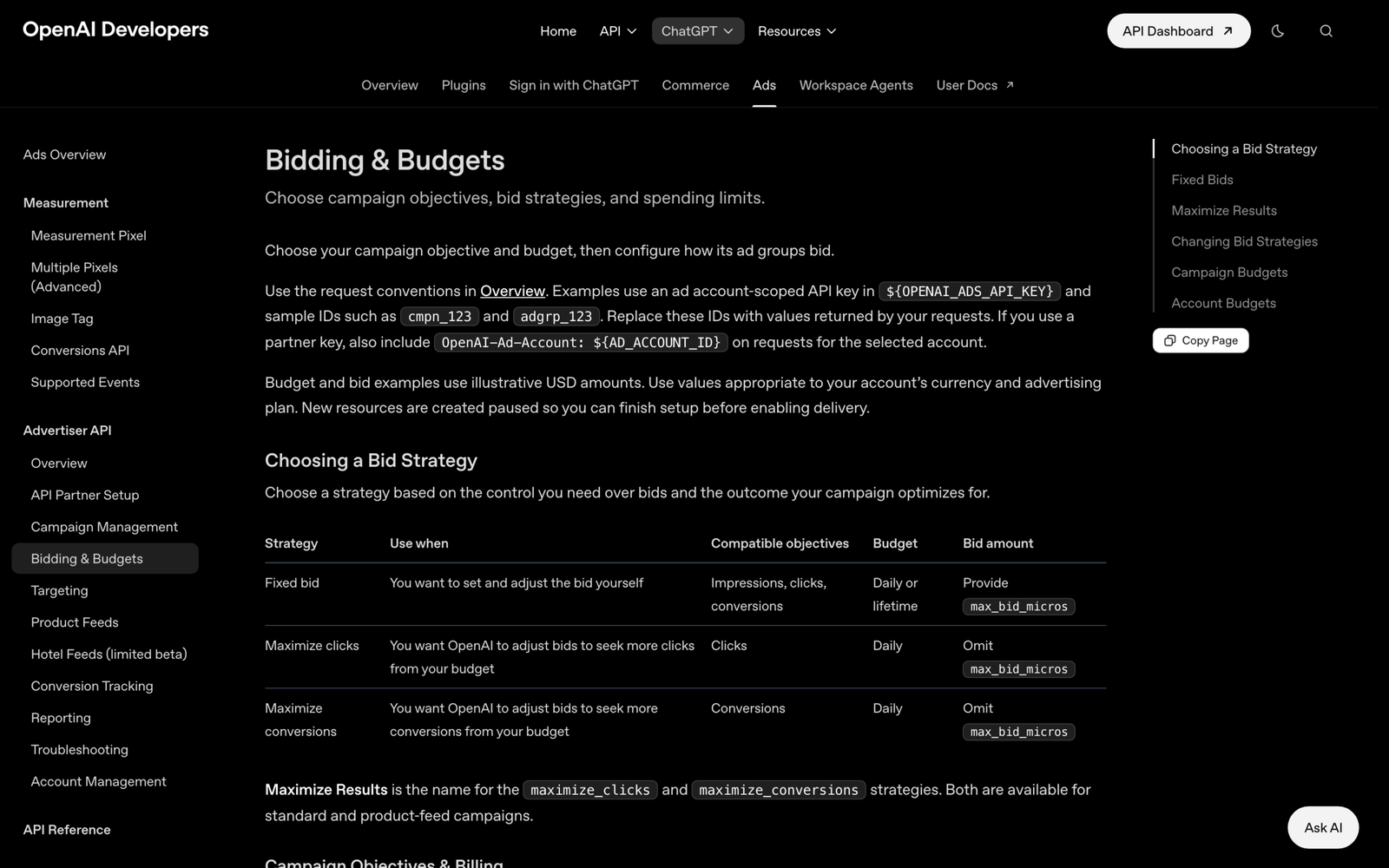
Budgets are either a campaign total or a daily amount, and the daily option behaves differently from most platforms. It is an average over a seven-day week that runs Sunday to Saturday in your account’s time zone. On any single day the campaign can spend up to twice the daily figure, and over the week it will not exceed seven times it. If it spends the weekly allowance early, it can sit idle until the next week while still marked active. The minimum daily budget depends on billing currency; the common ones are listed below.
| Currency | Minimum daily budget |
|---|---|
| USD | 25 |
| EUR | 15 |
| GBP | 15 |
| AUD / CAD | 25 |
| INR | 725 |
| JPY | 2,500 |
| VND | 120,000 |
Three targeting details are easy to miss. To target only the United States you must include it explicitly; excluding other countries is not enough. Platform targeting splits delivery across Android app, Android web, desktop web, iOS app and iOS web, and reporting can be segmented the same way. Custom audiences need at least 25,000 matched users to include, and OpenAI advises against them for the EEA and Switzerland while ads personalization is unavailable there. On your first campaign, the start and end date fields may not appear until after you publish, so if the date matters, do not publish just to reach them.
A sensible first setup is a Clicks campaign at a $3 to $5 maximum CPC with a daily budget comfortably above the minimum. The check is simple arithmetic: a $50 daily budget can spend up to $100 on one day and $350 across the week, and your reports should never exceed those ceilings.
6.Write Context Hints That Describe Real Conversations
Inside each campaign, ad groups organize ads around one product, service or customer need, and each ad group carries context hints. A context hint is a phrase that tells the system when your offer is useful: what it is, who it helps and in what situation. OpenAI is explicit that hints are not exact-match keywords or targeting rules and do not guarantee delivery in any particular conversation.
Hints matter because they are one of the few direct inputs you give the orchestrator beyond your creative and landing page. A hint that only repeats your product category adds nothing the system cannot already read from your site. A hint that names the person and the moment helps it connect your offer to a conversation that never mentions your category by name.
Split ad groups by need before writing a single hint. OpenAI’s own example is a plumbing business with one group for emergency repairs and another for preventive maintenance: same business, different moments, different landing pages. The example below applies the same split to a project-management tool, showing a weak hint next to stronger ones for each group.
Ad group: Freelancers juggling clients
  Weak:   project management software
  Strong: simple client project tracker for freelance designers with five to ten active clients
  Strong: invoice and deadline reminders for solo consultants who miss follow-ups

Ad group: Small agencies moving off spreadsheets
  Weak:   team collaboration tool
  Strong: replacing a shared spreadsheet with task boards for a 5-20 person marketing agency
  Strong: client approval workflow for agencies that send drafts by email
The strong versions describe situations a person would explain in a ChatGPT conversation, which mirrors how the orchestrator rewrites a chat into short commercial queries. OpenAI’s help center makes the same point with running shoes: a hint about cushioned everyday shoes for beginners training for a first 5K is more useful than the bare phrase “running shoes”.
Check your structure before launch. Each ad group should cover one need, each hint should add information that is not already obvious from the landing page, and once the campaign runs, every ad group should show impressions. A group with none after a few days usually has hints that describe no conversation people actually have.
7.Write Ads That Survive Review and Earn the Click
Every ad is reviewed before it can run. OpenAI’s systems, a mix of language models and classifiers with human escalation for harder cases, check the title, description, image and landing page against the ad policies, and anything the systems cannot evaluate does not run. Review continues after approval through user reports, so an ad can be limited or removed later.
Coverage is the part most advertisers underweight. OpenAI’s guidance is to build several distinct title and description variations for each offer, each with a different angle, because a larger and more varied set gives the system more conversations where one of your ads is the relevant answer. Benefit-focused copy works better than slogans: say what the product does, who it is for and when it helps. Remember that ChatGPT’s neutral introduction sits above your creative, so a vague title next to it reads as filler.
The example below shows one offer written three ways for the freelancer ad group above. Each pair takes a different angle, so they can match different conversations instead of competing for the same one.
Title: Track every client project in one place
Copy:  Deadlines, files and invoices for freelancers with several clients. Free for your first three projects.

Title: Stop chasing late invoices
Copy:  Automatic payment reminders tied to each project, so solo consultants get paid without awkward emails.

Title: Move off your client spreadsheet in an afternoon
Copy:  Import your sheet, get a task board per client, and share progress links clients can open without an account.
The landing page is part of the ad. Link each creative to the most relevant page, such as a product, collection or use-case page rather than the homepage, and add UTM parameters directly to each creative’s URL; they persist on click and show up in your existing analytics. Ad-review crawlers may visit those URLs with the parameters attached, so some “paid” visits in your analytics are review traffic, which is not billed.
Your site must not block OpenAI’s crawlers, or the landing page fails review. If your robots.txt uses broad disallow rules, add explicit allowances like the ones below for the two user agents OpenAI names, OAI-AdsBot and OAI-SearchBot.
User-agent: OAI-AdsBot
Allow: /

User-agent: OAI-SearchBot
Allow: /
Keep images simple and literal: the product, the interface or the result, matching the title. Ads Manager can also prefill an ad draft from your site’s metadata through the “Add new ad” option; it does not generate new copy or images, so review it like anything else you publish. The check before scaling is that every ad shows as approved and serving, and that a test click arrives in your analytics with the UTM parameters intact.
8.Install the Pixel and Conversions API
UTM tags tell you who clicked; they do not tell Ads Manager what happened next. For that, OpenAI’s measurement documentation offers two paths: a JavaScript pixel that runs in the browser and a Conversions API that your server calls directly. You need at least one before a Conversions campaign is possible, and the impression-billed version also counts view-through conversions, which click-based tracking cannot see at all.
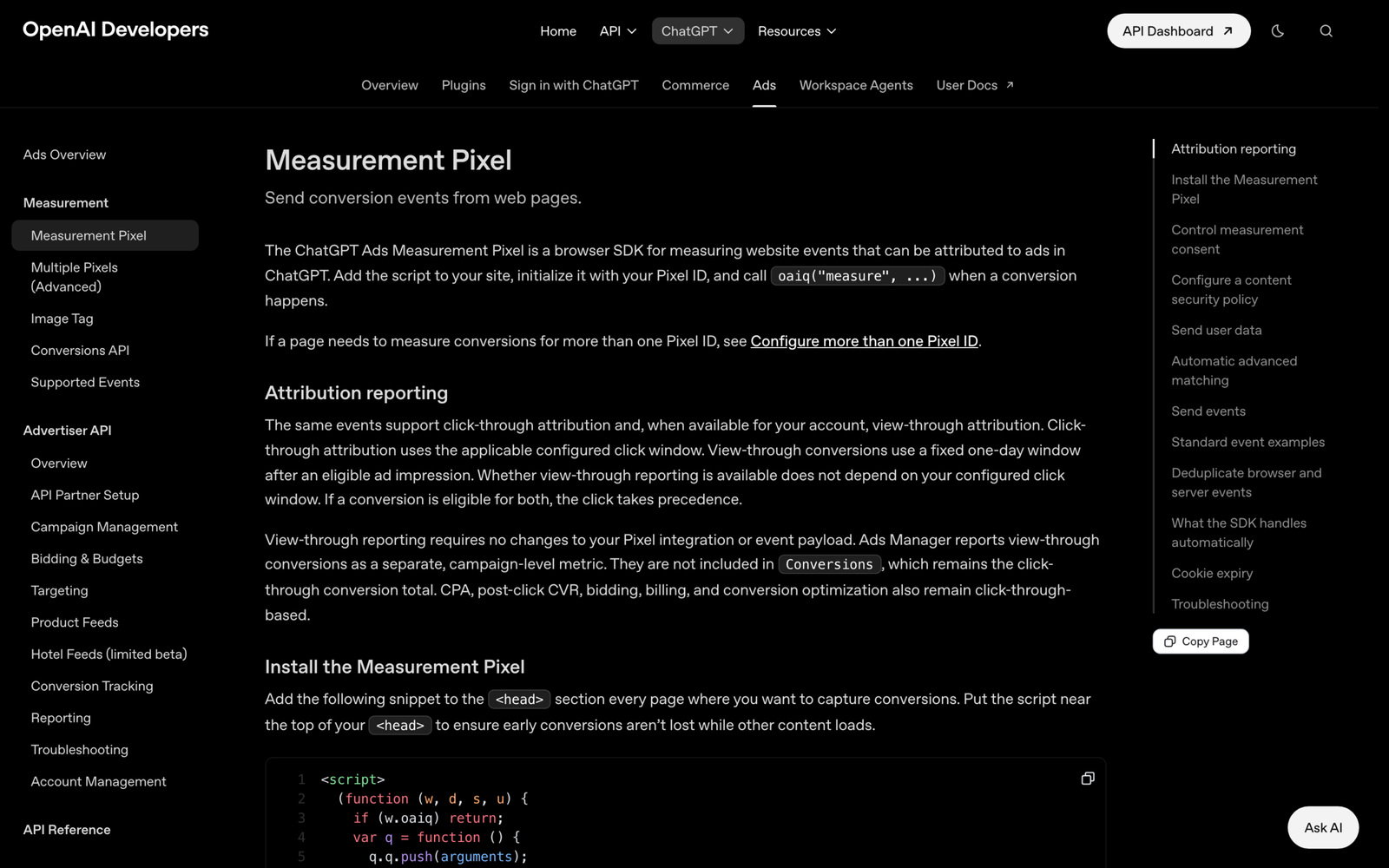
The pixel loads from a short snippet placed near the top of the head on every page where conversions can happen. Create the pixel ID in the conversions tab of Ads Manager, then paste the snippet below with your ID in place; the optional debug flag logs activity to the browser console while you test.
<script>
  (function (w, d, s, u) {
    if (w.oaiq) return;
    var q = function () { q.q.push(arguments); };
    q.q = []; w.oaiq = q;
    var js = d.createElement(s); js.async = true; js.src = u;
    var f = d.getElementsByTagName(s)[0]; f.parentNode.insertBefore(js, f);
  })(window, document, "script", "https://bzrcdn.openai.com/sdk/oaiq.min.js");

  oaiq("init", { pixelId: "<YOUR-PIXEL-ID>", debug: true });
</script>
Conversions are sent with a measure call that names a standard event. The supported standard events cover most funnels: page_viewed, contents_viewed, items_added, checkout_started, order_created, lead_created, registration_completed, appointment_scheduled, subscription_created and trial_started. Custom events exist, but conversion optimization accepts only one standard event per campaign. The example below records a purchase; amount is an integer in the smallest unit of the currency, so 2599 means $25.99.
oaiq("measure", "order_created", {
  type: "contents",
  amount: 2599,
  currency: "USD",
  contents: [{ id: "sku_123", name: "Starter bundle", content_type: "product", quantity: 1 }]
}, { event_id: "order_12345" });
The event_id is what keeps your numbers honest if you also send conversions from your server. The Conversions API accepts the same events at https://bzr.openai.com/v1/events?pid= with a bearer API key, in batches of up to 1,000, and timestamps must fall within the last seven days. When the browser and the server report the same order with the same pixel ID, event name and ID, OpenAI keeps the first one received and ignores the duplicate. Never call the Conversions API from page code, since that would expose the key.
Consent is handled in the pixel itself. If your site needs opt-in, call oaiq("consent", false) before init and switch it to true when the visitor agrees; events blocked while consent was false are not replayed later. Hashed email or phone values can be passed in the init call to improve matching, normalized and SHA-256 hashed before they leave the page.
Measurement is working when debug mode shows each event firing in the console, Ads Manager lists conversions against your test campaign, and a purchase sent from both browser and server appears once, not twice.
9.Read the First Two Weeks of Results
Ads Manager reports impressions, clicks, spend, click-through rate, average CPC, average CPM and conversions, in a table by campaign, ad group and ad, in charts over time, and as CSV exports. Impressions, clicks and CTR refresh about every 15 minutes, but spend can lag seven to eight hours, so a campaign showing clicks and zero spend has not run for free. Judge daily performance the next morning, not the same evening.
OpenAI publishes no benchmark CTR, CPC or CPM, so the only reference points are early advertisers who shared their numbers. Search Engine Journal collected several in September 2026, and the spread is the main lesson. The table below lists the published figures with their context; treat them as a range to sanity-check against, not as targets.
| Advertiser or test | Spend | Reported result |
|---|---|---|
| Common Thread Collective (high-value ecommerce client) | $9,620 | $4.41 average CPC, 0.94% CTR, estimated ROAS 3.3x to 6.8x depending on attribution |
| B2B campaign shared by Floyd Blaikie | About CAD 7,000 | $9.29 CPC, $64.34 CPM, 0.7% CTR; 5 of 146 identified organizations matched the target customer profile |
| Synter test | $4,428.84 | $9.89 CPC overall, from $5.10 in the UK to $10.62 in the US and $22.89 in New Zealand |
| Hostinger | Nearly $70,000 | CPMs above $65; click-through rate was the bigger concern, and specific use cases beat broad messaging |
Two patterns stand out. Costs vary by market by a factor of four or more, so a CPC that looks expensive in Australia may be normal there. And click metrics alone mislead: the B2B test had a reasonable click-through rate and almost no clicks from the right companies. Judge each ad group on cost per qualified lead or on revenue, using your own analytics with the UTM tags, and treat CTR as a diagnostic.
Change one thing at a time. If an ad group gets impressions but few clicks, rewrite the creative. If it gets no impressions, rewrite the context hints or the landing page. If clicks are cheap but none convert, check the landing page and whether the conversation stage is right. After enough volume, give every ad group one of three labels, keep, fix or cut, tied to a business number rather than to engagement.
10.Who Should Test ChatGPT Ads Now
The businesses with the clearest case for a test today are consumer, local-service, travel and digital-product sellers in a self-serve country, whose customers already research purchases by asking questions. They fit the allowed categories, the conversation-led matching rewards what they sell, and a small Clicks campaign at the minimum budget is cheap enough to learn from in two weeks.
Businesses in finance, health or legal outside the United States, or in any disallowed category, should wait; no amount of creative work gets around the policy. B2B advertisers can test, but should measure company fit from the first click, as the early B2B numbers show. OpenAI has said more formats, objectives, buying options and measurement tools are coming, so whatever you learn from a small, tracked test now carries forward when they arrive.