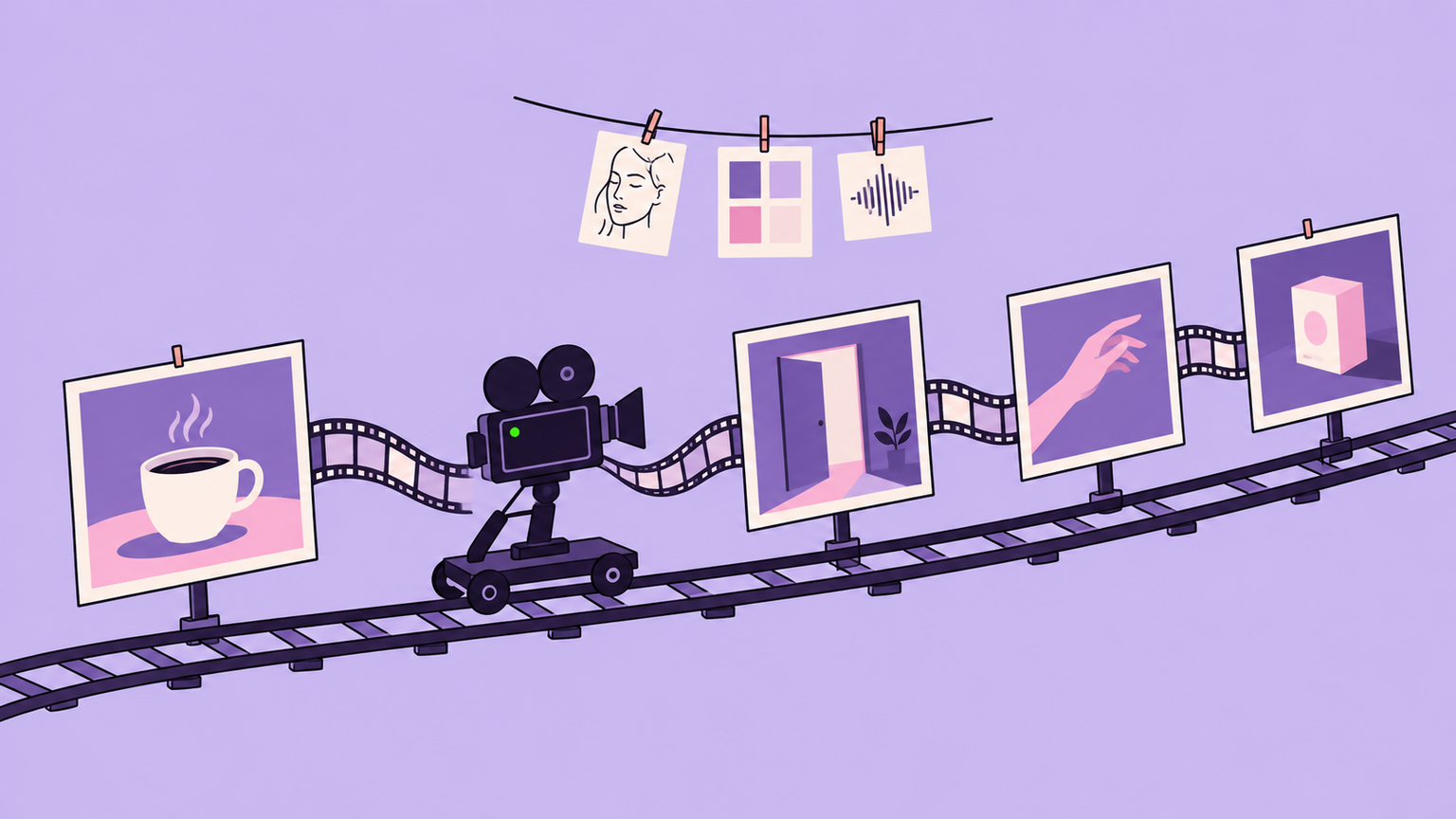
Kling 4.0 is the new video model from Kuaishou’s Kling AI, and it became available to everyone on the Kling website on October 15, 2026. It can generate a single take of up to 30 seconds, and it accepts up to 10 keyframes and up to 15 reference assets in one generation.
Those numbers matter because they change how you work. With earlier models you generated short clips and stitched them together, hoping a character’s face and clothes stayed the same. Kling 4.0 is built so that you plan a shot in advance: you pin the important moments, give it the people, products and camera moves you want, and let it fill in the motion between them.
This guide covers what changed, which version and plan you need, what it costs, and how to set up and direct a shot. The facts come from Kling’s own release note, feature page and plan pages as checked on October 18, 2026. We have not generated our own clips with it, so quality claims here are Kling’s or those of early testers.
In this article
1.What Kling 4.0 Is
Kling 4.0 is a video generation model that makes clips from text, images, video and voice references. It replaces the Kling 3.0 series as Kling’s main model, and it comes in two versions: the full Kling 4.0 and a faster, lighter Kling 4.0 Flash.
Flash arrived first. It went to a limited group of top-tier annual subscribers on September 28, 2026, and the full model launched on Kling’s site for all users on October 15. Kling describes the update as being about realism, control and professional quality.
Four changes matter more than the version number:
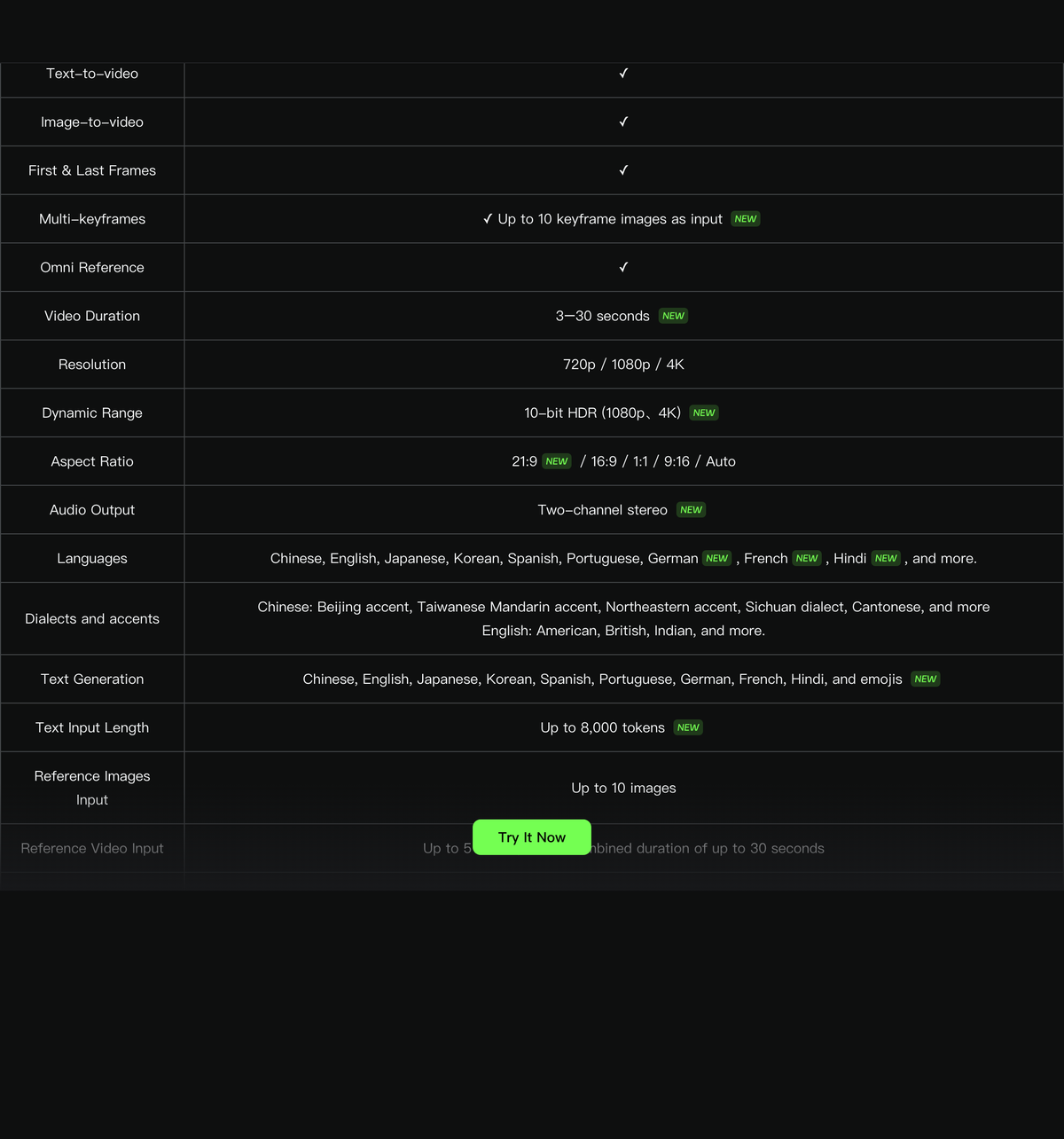
- Longer takes. One generation can now run from 3 to 30 seconds. A 30-second take is long enough for a complete product demo, a short scene with dialogue, or a continuous camera move, without cutting between separate clips.
- Keyframes. You can place up to 10 still images along the timeline to fix what a character or scene looks like at specific moments. The model generates the movement between them.
- More references. Up to 15 reference items per generation, mixing images, videos, reusable characters or objects (Kling calls them elements) and voice samples.
- Sound and text. Clips come with two-channel stereo audio and lip sync, which Kling says is more accurate than before. The model can also render readable on-screen text in nine languages, plus emoji.
Dialogue works in Chinese, English, Japanese, Korean, Spanish, Portuguese, German, French and Hindi. Accents include American, British and Indian English, plus several Chinese regional accents such as Cantonese.
The simplest way to describe it: Kling 3.0 made good clips, and Kling 4.0 is designed to make planned shots.
2.Kling 4.0 or Kling 4.0 Flash
The two versions share the same core abilities, text-to-video, image-to-video and Omni Reference, but Flash trades output quality for speed and cost. Kling positions Flash for frequent, everyday creation and the full model for finished work.
The table compares the two using Kling’s published specifications.
| Feature | Kling 4.0 | Kling 4.0 Flash |
|---|---|---|
| Clip length | 3 to 30 seconds | 3 to 20 seconds |
| Resolution | 720p, 1080p, 4K | 720p |
| Starting image | First and last frame, plus up to 10 keyframes | First frame only |
| Omni Reference | Yes | Yes |
| Color | 10-bit HDR at 1080p and 4K (coming soon) | 8-bit standard range |
| Best for | Final shots, ads, dialogue scenes | Drafts, tests, social content in volume |
Two rows decide most choices. Flash has no keyframes and no last frame, so you cannot pin where a shot ends or what happens in the middle; the model decides. And Flash stops at 720p, which is fine for a phone feed but too soft for a large screen or for cropping in an editor.
A practical rule follows from this. Use Flash to test an idea, a prompt or a reference combination, because mistakes there cost less. Switch to the full model once the shot is right and you need keyframe control, a longer take or a higher resolution for delivery.
If you can say whether a job is a draft or a final shot, you know which version to select.
3.Who Can Use It and What It Costs
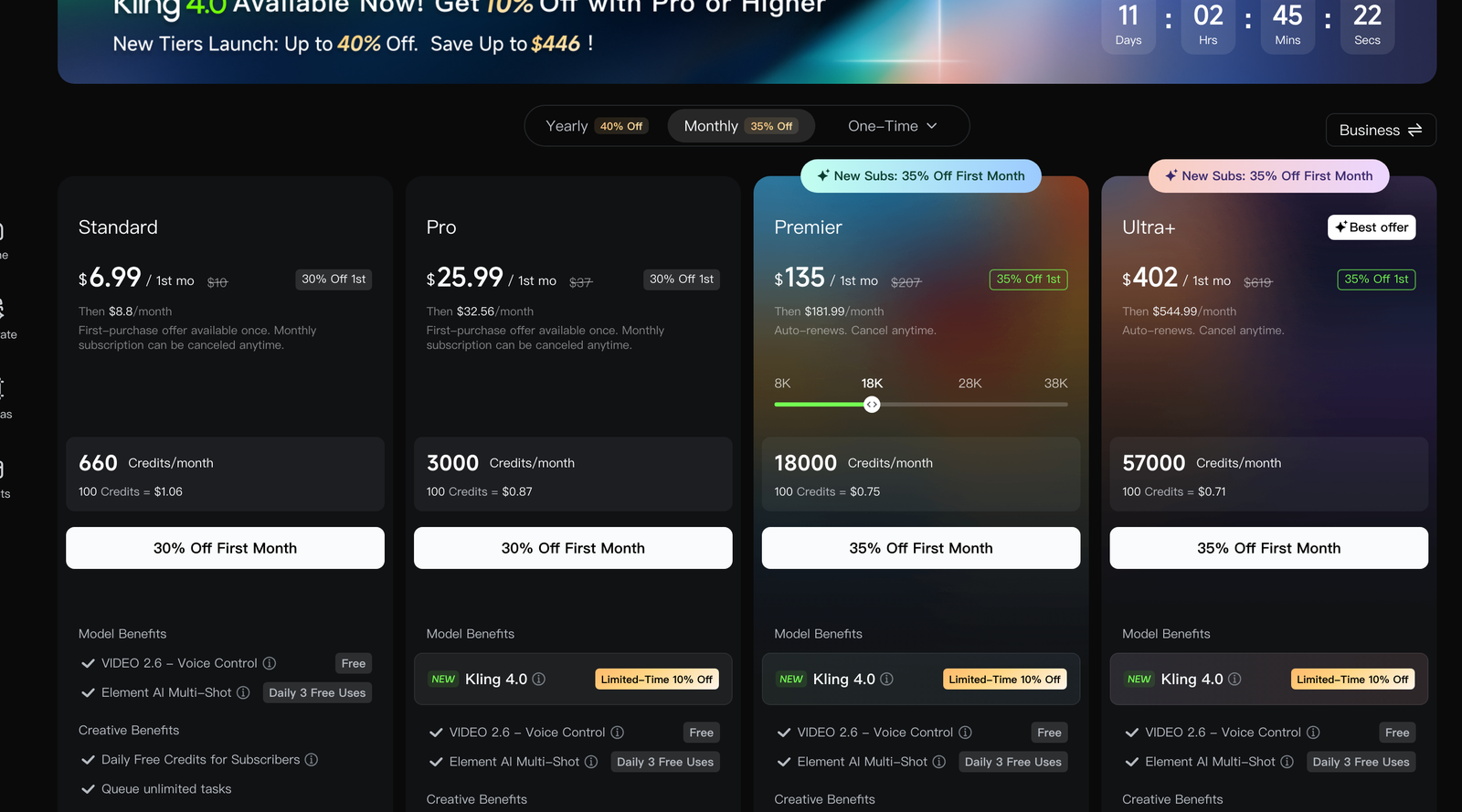
Kling 4.0 runs on Kling’s credit system, and not every plan includes it. On the plan page we checked on October 18, Kling 4.0 is listed as a model benefit on the Pro, Premier and Ultra+ plans, each with a limited-time 10% discount on 4.0 generations. The cheapest Standard plan does not list it.
These are the monthly prices Kling showed to a signed-out visitor in the United States. Prices change with promotions, and yearly billing is cheaper.
| Plan | First month | Then per month | Credits per month | Lists Kling 4.0 |
|---|---|---|---|---|
| Standard | $6.99 | $8.80 | 660 | No |
| Pro | $25.99 | $32.56 | 3,000 | Yes |
| Premier (18K option) | $135 | $181.99 | 18,000 | Yes |
| Ultra+ | $402 | $544.99 | 57,000 | Yes |
Generation is billed per second of video. Kling’s billing note in the composer adds one rule that is easy to miss: the length of any video you upload as a reference counts toward the billed duration. A 10-second motion reference used for a 20-second clip is billed as 30 seconds, not 20.
Kling has not published a per-second credit rate for 4.0 on a public page, and its Credits Policy says the cost is whatever the interface shows at the time. In practice, the composer shows the credit cost for your current settings before you press Generate. Resolution, length and the number of outputs all change it. Two other details from the policy help with budgeting: a failed generation refunds its credits, and extra credits bought outside a plan cost $1 for 66 credits and last two years.
Developers should note one gap. Kling’s API pricing page states that its current API plans do not support Kling 4.0, and the launch announcement says API access is coming soon. For now, 4.0 is used through the website, desktop and mobile apps, and Kling’s own MCP and command-line tools.
To estimate your monthly output, set up a typical shot in the composer, read its credit cost, and divide your plan’s monthly credits by that number.
4.Set Up Your First Shot
Kling redesigned its creation page for this launch. Everything now goes through one input box: you type the description and attach images, videos, saved characters or a voice sample in the same place, and use @ to refer to an attached asset by name inside the prompt.
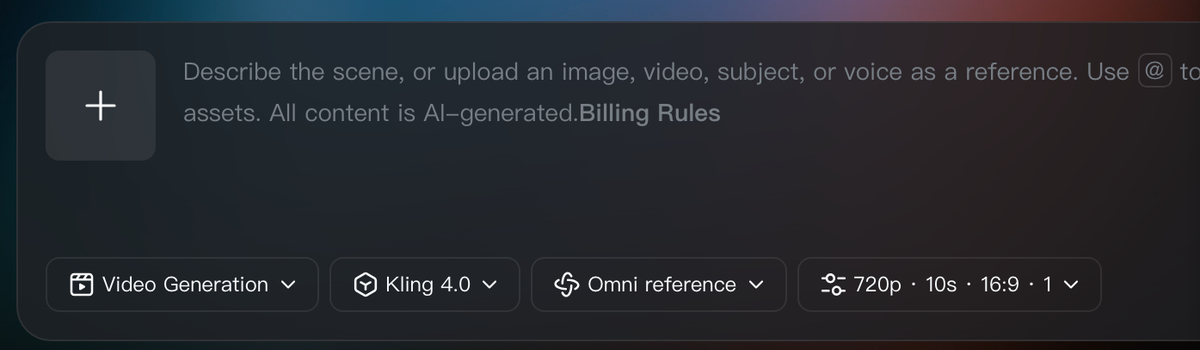
Below the box sit four controls, read left to right:
- Task type, set to Video Generation for a new clip.
- Model, where you choose Kling 4.0 or Kling 4.0 Flash.
- Reference mode, set to Omni reference when you attach assets.
- Output settings: resolution, length, aspect ratio and number of results. The default is 720p, 10 seconds, 16:9 and one result.
That default is a sensible starting point because it is cheap. A good order for a new idea is to draft short and low, check the result, then spend credits on the long, high-resolution version. Every retry at 30 seconds and 1080p costs many times more than a 10-second draft at 720p.
Prompts can be short or very detailed, up to 8,000 tokens. Kling says the model expands a thin prompt the way a director would, and its own example is just six words: “An old man ranting about AI.” For anything you need to control, describe the shot rather than the topic. A prompt in the style of Kling’s longer example looks like this:
That prompt sets the length, camera style, setting, action, a line of dialogue with an accent, and the sound you want. Each element is something the model can be judged against when the clip comes back.
Check the draft against the prompt one element at a time. If the action, framing and voice are right at 720p, the shot is ready for a longer, sharper render. If not, change the prompt or add references before spending more.
5.Direct It With Keyframes and References
Keyframes and references are the two tools that turn a generated clip into a directed shot. Keyframes control when things happen, and references control what things look like and how they move.
Keyframes are still images placed along the timeline, up to 10 in a full Kling 4.0 generation. Each one fixes a moment: a character’s pose, a change of location, or a product turned toward the camera. The model then generates the motion between them. For a 30-second product ad, you might set the opening frame, the moment the product is picked up, the close-up of its label and the final pack shot, and leave the movement in between to the model.
Omni Reference accepts up to 15 items in one generation, within these limits from Kling’s specification:
- Up to 10 images, such as character photos, three-view character sheets, image grids, storyboards, wireframes and layout sketches.
- Up to 5 videos, with a combined length of up to 30 seconds, to guide performance, action, camera movement and pacing. This includes simple grey 3D blocking renders, which Kling calls white-model videos, and depth-map videos.
- Up to 7 elements, Kling’s saved characters or objects, of which up to 3 can be defined by video.
- Voice references, which give a character a specific voice. Audio input is limited to voice samples.
The video limit is the one to plan around. All reference videos share one 30-second allowance, so a 12-second camera-move clip leaves 18 seconds for any others, and, as the billing note says, every second of uploaded video is also billed.
Here is how a budget might look for a two-person dialogue scene. You attach two character elements, one three-view sheet per character so faces stay consistent from every angle, one image of the location, a voice sample for each character, and a 6-second clip of the camera move you want. That is seven reference items out of 15, and 6 seconds of the video allowance. Add keyframes for the start and end of the scene, and the model has a defined cast, place, camera and voices.
Give every reference a single job. A reference with no clear purpose gives the model another thing to blend in, and early testers report that the model already adds details nobody asked for. You know the setup works when each character keeps the same face and clothes across the take and the camera follows the reference movement.
6.Recreate and Edit Existing Video
Kling 4.0 can also start from video you already have, in two ways.
Creative recreation borrows the structure of an existing video and swaps the content. You attach a reference video and a new product, character or other asset, and the model keeps the original’s pacing, shot composition and visual style while replacing what is in it. Kling aims this at social media, product advertising, fashion, beauty and electronics, where a format that already works can be reused for a new product. Only use footage you have the rights to adapt.
Targeted editing changes one part of a clip and keeps the rest stable. According to Kling, you can edit a character’s expressions or body movement, the camera position or movement, the overall style and the background, and replace or remove characters and objects. This is cheaper than regenerating a whole shot when only one thing is wrong, such as a hand gesture or a background sign.
Editing has its own limits. You can supply up to 5 clips, one of them the primary video you are editing, and each must be between 3 and 30 seconds long. Together they cannot exceed 30 seconds, so a 20-second primary clip leaves 10 seconds for supporting clips, enough for only three of them at the 3-second minimum.
Check an edit by comparing it frame by frame with the original. Only the element you targeted should change; if lighting, faces or timing shifted elsewhere, narrow the instruction or reduce the supporting clips and try again.
7.What Is Not Ready, and Whether to Switch
Several features in the launch materials are marked as coming soon, and you should not pay for a plan on the strength of them:
- 10-bit HDR output at 1080p and 4K, for richer color and better detail in night and backlit scenes. Kling’s feature page also describes native 4K and 1080p as coming soon, while its release note lists 4K as a supported resolution, so check the resolution menu on your own account.
- Video extension, which will let you upload a clip and extend it several times, up to 2 minutes.
- API access for developers and businesses.
- Adobe Firefly, where Adobe says Kling 4.0 and 4.0 Flash will be added.
Early testers have also reported specific weaknesses, mostly while testing the Flash preview. The model sometimes adds actions that were not in the prompt, and in one test it added a jacket that was not in the reference image. Some performances read as emotionally flat even when the lip sync and continuity were correct. The same testers reported that lip sync drift, a known problem in Kling 3.0, appeared to be largely fixed. Kling has not published benchmark results.
The decision depends on the type of work:
- Upgrade now if you make ads, product videos or dialogue scenes where character consistency and longer takes save you editing time. Keyframes and the 30-second limit are available today.
- Use Flash for testing ideas and high-volume social content at 720p, and move to the full model only for the shots you keep.
- Wait if you need HDR, clips longer than 30 seconds or API access. None of those are live yet.
- Stay on your current plan if it is Standard and your clips are short, simple social posts. The 4.0 features you would gain are mostly about control over longer shots.
The fairest test is one shot you have already made. Recreate it with Kling 4.0 using the same idea, add keyframes and references, and compare the result and the credits it took. That one comparison will tell you more than any launch video.