I made a 10.5-second vertical video about Tulip Mania, the 1637 Dutch bulb crash, in a vintage engraving-collage style. AI did not animate it. fal.ai made the art as separate cut-out layers, and Claude Code wrote the animation as a React program in Remotion. The image bill for the whole video was $0.56.
This guide walks through every step of that workflow: how the style gets captured once and reused, why the images come from fal.ai, how each scene becomes a stack of layers, how the code animates them, and how voice, music and sound effects get timed to the picture. Every command, file and number below comes from the actual run.
The whole workflow is packaged as a free Claude Code skill, style-motion on GitHub, with the Tulip Mania example included. The next sections show how to install it, then how each step works.
In this article
- What This Workflow Produces
- Install the style-motion Skill
- Step 1: Lock the Reference Style
- Step 2: Choose How to Generate the Images
- Step 3: Plan Each Scene as Layers
- Step 4: Generate the Layers on fal.ai
- Step 5: Animate the Layers in Code
- Step 6: Add Voice, Music and Sound
- Where This Workflow Breaks
1.What This Workflow Produces
The output is a 1080×1920 video at 30 frames per second where every movement is code. Each scene is a stack of layers: a cream paper background, flat green and gold circles drawn in code, a torn map cut-out, a hero illustration, one or two prop cut-outs, a thin gold orbit ring, small sparkles, and editorial text. Remotion renders the stack frame by frame in a headless browser.
The split of work is the whole idea. An image model is good at drawing a tulip in a 19th-century engraving style. It is poor at moving that tulip consistently across 100 frames. Code is the opposite: it cannot draw an engraving, but it can move a layer 14 pixels over 3.4 seconds on a damped spring, identically on every render. Image-to-video models repaint every frame, so details drift and you cannot change one element without regenerating the whole clip. Layers animated in code keep the art fixed and make the motion editable.
Here is the finished Tulip Mania video, one frame from each of its three scenes. The text is set in code, not drawn by the model:
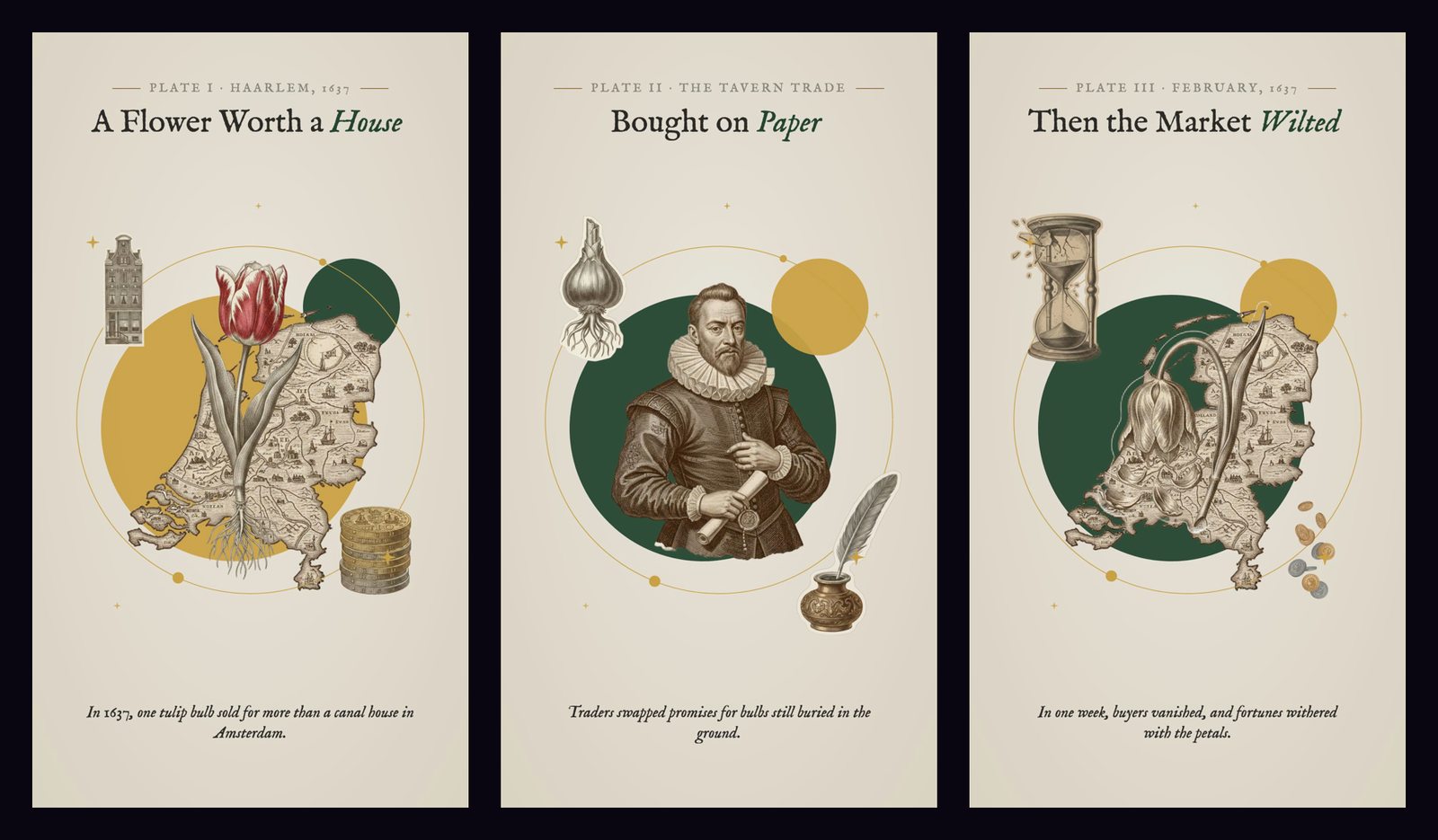
The three scenes tell one short story: a bulb worth a canal house, traders buying bulbs on paper, and the February 1637 collapse. Each scene has one visual metaphor, and the hero cut-out carries it: the striped tulip, the merchant holding a contract, the wilting tulip. That rule, one metaphor per scene carried by the hero, shapes every later step.
2.Install the style-motion Skill
The skill is a folder of instructions and scripts that Claude Code loads when you type /style-motion. Installing it means copying that folder into your project and pointing it at a fal.ai key and a Remotion project, so Claude can generate the layers and render the video for you.
You need four things first. Claude Code itself, a fal.ai API key saved as FAL_KEY, Node 18 or later with a Remotion project (npx create-video@latest creates one) plus ffmpeg, and Python 3.9 or later. Python’s OpenCV and NumPy are only needed for the learn command that reads a reference video.
These commands download the skill from GitHub, copy it into your project’s skills folder, set the two settings it reads, then run its own setup and health check:
Install
git clone https://github.com/ArtimindStudio/claude-style-motion-skill
mkdir -p your-project/.claude/skills
cp -R claude-style-motion-skill/style-motion your-project/.claude/skills/
cd your-project
export FAL_KEY=your-fal-key
export STYLE_MOTION_REMOTION=my-video
python .claude/skills/style-motion/scripts/style_motion.py install
python .claude/skills/style-motion/scripts/style_motion.py doctor
STYLE_MOTION_REMOTION is the name of your Remotion project folder, and FAL_KEY can live in a .env file instead of the shell. To make the skill available in every project rather than one, copy the style-motion folder into ~/.claude/skills/ and run the same commands from your project root.
The install is working when doctor reports no missing pieces. Then open Claude Code in the project and ask for a first video in plain words, for example:
The rest of this guide explains what the skill does at each step, so you can adjust a style, re-run one scene or change the animation instead of treating it as a black box.
3.Step 1: Lock the Reference Style
A style is a saved file, not a sentence you retype in every prompt. In my setup each style lives in its own folder with two things: a style.json file and a refs/ folder of reference frames. The JSON holds the palette, the image prompt, the prompt for isolated cut-outs, a negative prompt, the typography and the motion rules. The reference frames get sent to the image model with every request, so the model sees the look instead of guessing it from adjectives.
This matters because style drift starts at the prompt. If scene one says “vintage collage” and scene three says “antique engraving collage”, you get two different looks. With one file, every scene and every cut-out uses the same words, the same colors and the same reference images.
To learn a new style, you give the command a reference image or video. For a video it samples six frames, measures the dominant colors by area, and writes a draft style file:
Run
python .claude/skills/style-motion/scripts/style_motion.py learn vintage-collage reference.mp4The draft is a starting point. The measured palette is only a list of colors, so the next part is manual: open the frames, then rewrite the palette roles, the image prompt, the cut-out prompt and the motion rules to describe what you actually see. Remove reference frames that contain user interfaces or captions, since the model copies text it sees. Three or four clean frames are enough. This is the core of the vintage-collage style file I used. The color values are what later code reads, and the prompt words go into every image request:
{
  "palette": {"paper": "#E9E4DA", "ink": "#2B2A26", "green": "#24442F", "gold": "#C9A043"},
  "imagePrompt": "Vintage hand-engraved collage illustration, 19th-century copperplate etching cut-outs in sepia and grayscale, torn antique map paper fragments, flat forest-green and burnished gold-leaf circles behind the subject, botanical engravings framing the edges, thin gold orbit lines with small dots and four-point sparkles, warm cream textured paper background, no text",
  "elementPrompt": "single isolated vintage copperplate engraving cut-out of {subject}, sepia and grayscale etching, crisp paper cut edge, centered, plain pure white background, no shadow, no text"
}
For this article’s video I made a second style, vintage-collage-editorial, which reuses the same art and reference frames but swaps the typography: a small-caps “Plate I · Haarlem, 1637” line between gold rules, an IM Fell English serif headline with the key word in green italic, and an italic serif caption in place of a white pill. Art style and text style are separate fields, so you can change the voice of the type without touching the images.
You know the style is locked when a one-scene test matches the reference side by side. If it does not, fix the style file, not the scene. A fix in the scene only repairs that scene. A fix in the style file repairs every future video.
4.Step 2: Choose How to Generate the Images
There are several ways to get AI images into this workflow, and they differ in cost per image, whether Claude can call them directly, and whether you can get a transparent cut-out from the same account. This is how the routes compare for a layered-collage job. Prices are list prices per image as of October 2026:
| Route | Price per image | Claude can call it | Batch + cache | Background removal |
|---|---|---|---|---|
| ChatGPT or Gemini chat app | Subscription, manual | No (a human pastes prompts) | No | No |
| OpenAI API, GPT Image 1 high quality, 1024×1536 | $0.25 | Yes, with your own code | Your code | No |
| Google Gemini API, Gemini 2.5 Flash Image | About $0.039 | Yes, with your own code | Your code | No |
| Video platforms with image tools (Higgsfield and similar) | Credit plans | Through their own MCP or UI | Partly | Varies |
| fal.ai, Nano Banana edit + BiRefNet | $0.0398 + about $0.0003 per cut-out | Yes, through MCP or one API key | Yes (queue API) | Yes, same key |
Chat apps are the cheapest if you already pay for them. They are the worst fit here because every image needs a person to paste a prompt, and you get flat pictures with backgrounds instead of cut-outs. The OpenAI API is easy to script, but at $0.25 for a high-quality portrait image, 14 images cost $3.50 before any background removal. Google’s direct API matches fal.ai on price for the same model class, but it only generates images, so you still need a separate background-removal service and a second account.
Across these routes, fal.ai with an MCP connection was the cheapest and most effective setup I found for this specific job. The per-image price matches Google direct, not beats it, but one fal key covers the image model, the background removal model and hundreds of alternative models behind the same queue API. The whole Tulip Mania image bill was $0.5610: $0.5572 for 14 images and $0.0038 for 11 background removals. The background removal model, BiRefNet, is billed by compute time, and the 11 cut-outs used 6.58 seconds of it.
The MCP connection is what lets Claude Code use fal.ai without custom glue. fal hosts an official MCP server, so the setup is a single command with your key passed as a bearer header:
Install
claude mcp add --transport http fal-ai https://mcp.fal.ai/mcp --header "Authorization: Bearer $FAL_KEY"Through the MCP server, Claude can search fal’s model catalog, read a model’s input schema and run one-off generations while you explore a look. For the repeatable batch, the skill calls the same fal queue API directly with the same key from .env, which keeps runs scriptable, cached and logged. Keep the key in .env and in your MCP config only; never paste it into a chat or a commit. You know the connection works when claude mcp list shows fal-ai as connected.
5.Step 3: Plan Each Scene as Layers
The scene plan is a JSON file with one entry per beat of the voice-over. It turns a story into separate subjects the image model can draw one at a time. The command scaffolds it inside the campaign folder:
Run
python .claude/skills/style-motion/scripts/style_motion.py new tulip-mania-1637 --style vintage-collage-editorial --scenes 3Each entry names what the scene says and what it shows. The kicker and headline are the editorial text, accent marks the headline words set in green italic, and caption is the spoken line. The hero, props and backdrop fields are the parts that will each become a separate transparent layer, and circles picks palette colors for the code-drawn shapes. This is the first Tulip Mania scene:
{
  "id": 1, "seconds": 3.4,
  "kicker": "PLATE I · HAARLEM, 1637",
  "headline": "A Flower Worth a House", "accent": ["House"],
  "caption": "In 1637, one tulip bulb sold for more than a canal house in Amsterdam.",
  "hero": "single red and white flame-striped Semper Augustus tulip with bulb and roots",
  "props": ["tall narrow Dutch canal house with stepped gable", "stack of antique gold guilder coins"],
  "backdrop": "torn antique map of Holland",
  "circles": ["gold", "green"]
}
Planning in parts is the step most people skip. If you ask for “a tulip next to a house and some coins on a map”, you get one flattened picture that code cannot pull apart. Naming each part separately is what makes the parallax, the staggered entrances and the per-layer drift possible later.
Write each hero as a specific, drawable object with its defining detail: “flame-striped Semper Augustus tulip with bulb and roots”, not “a tulip”. The props should support the hero’s meaning, not compete with it. Here, the canal house and the coin stack make “worth a house” literal. The plan is ready when you can cover the props and the headline with your hand and the hero alone still tells you what the scene is about.
6.Step 4: Generate the Layers on fal.ai
The asset command reads the plan and the style, then makes two kinds of images per scene. First a plate: the full composed scene, generated with the style’s reference frames. The plate is never shown in the video. It is a layout reference that tells you what a balanced composition of those parts looks like. Then one image per part (hero, each prop, backdrop), each drawn alone on a white background and then cut out by the background removal model.
Generate one scene first and look at it before paying for the rest. Problems in the style show up in the first scene, and it is cheaper to fix them there:
Run
python .claude/skills/style-motion/scripts/style_motion.py assets tulip-mania-1637 --scene 1
python .claude/skills/style-motion/scripts/style_motion.py assets tulip-mania-1637
Every request goes through a cache keyed on the model name and the exact input, so re-running the command only pays for prompts that changed. In this run the torn map of Holland was requested by scenes 1 and 3 with the same prompt, so the second request cost nothing. Each paid call also appends a line to the campaign’s cost log, and a cost command totals it at fal’s live prices.
The cut-outs from all three scenes are below. Each one is a transparent PNG that code can place, scale and move on its own:
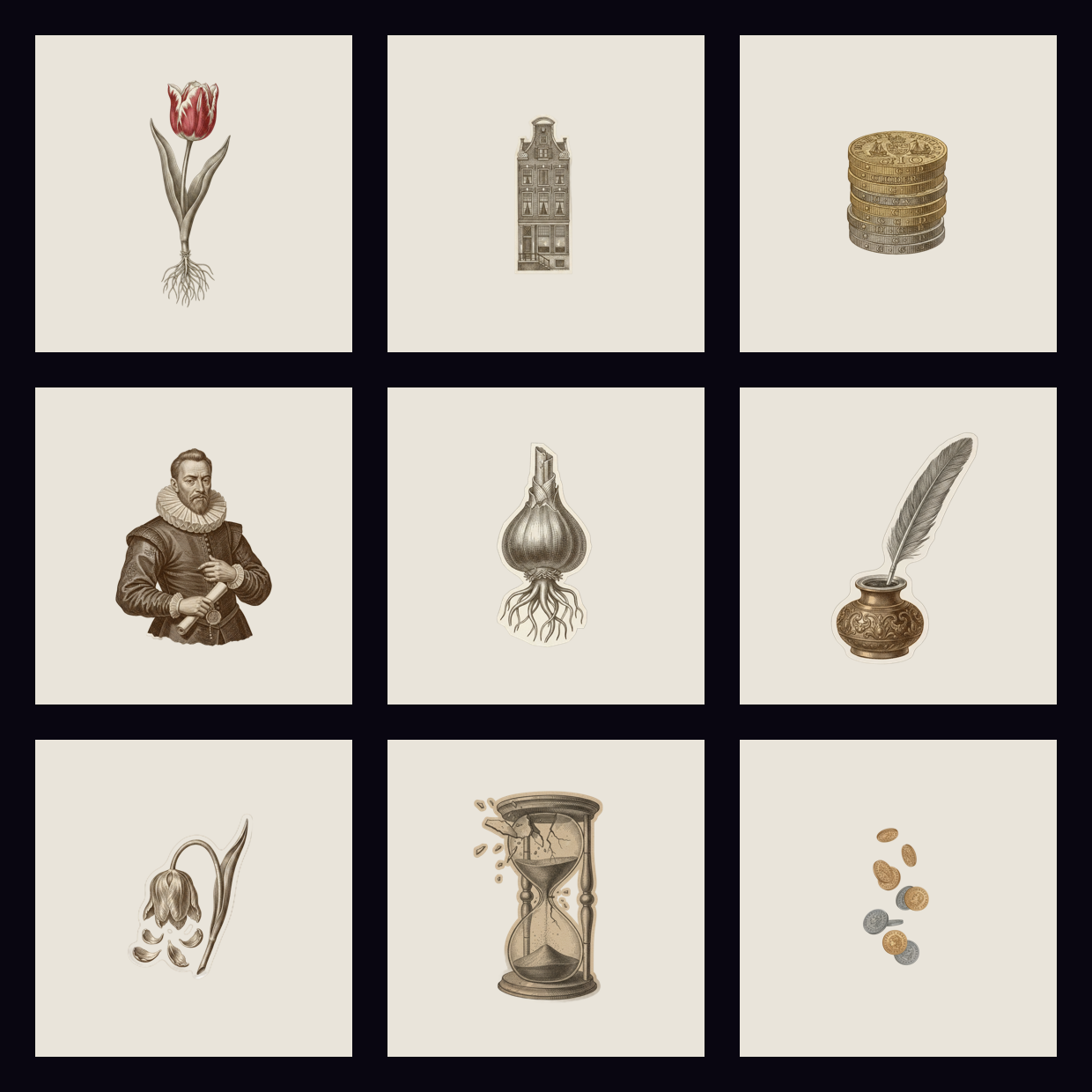
The two prompts work differently on purpose. The plate prompt describes a whole composition in the style. The cut-out prompt asks for “a single isolated” object on “plain pure white background, no shadow”. The white background is what makes background removal clean, and “no shadow” stops a gray halo around each cut-out. Check every cut-out against a dark and a light background: you want crisp paper edges, no white fringe, and no missing parts such as a cropped coin stack. If one fails, change that subject’s wording in the plan and rerun. Only that one request is paid again.
7.Step 5: Animate the Layers in Code
The animation is a Remotion composition, a React component that returns what one frame looks like as a function of the frame number. Claude Code wrote it once for the style. Each video only passes it new data: the plan, the style file and the cut-out paths. The render command copies the cut-outs into Remotion’s staging folder, converts scene seconds into frame ranges, and writes a props file the composition reads.
The motion rules come from the style file and are implemented as plain math on the frame number. Layers enter one after another about five frames apart on a damped spring, so nothing pops in all at once. While a scene holds, the hero grows 4 percent, props drift a few pixels in opposite directions for parallax, circles rotate a few degrees, the orbit ring draws itself on, and two gold dots ride around it. Scenes cross-dissolve with an eight-frame drift upward. The headline reveals word by word across the first 60 percent of the scene. This is the entrance logic for one layer, in the composition’s own code:
const enter = (i: number) => spring({frame: f - i * 5, fps, config: {damping: 18, mass: 0.8}});
// opacity follows the spring; the layer rises 40 px into place and drifts across the scene
transform: `translate(${drift * life * 14}px, ${(1 - e) * 40 - drift * life * 8}px) scale(${(0.94 + 0.06 * e) * (1 + extra * life)})`
Here f is the frame number inside the scene, life runs from 0 to 1 across the scene, and drift is each layer’s direction. Because every value comes from the frame number, the same frame always renders the same image. That makes renders reproducible and lets you fix one scene without touching the others.
Before the full render, the still mode writes the first and last frame of each scene so you can check the staging without encoding video. Then the full render runs with one browser worker, which keeps headless Chrome stable on a laptop:
Run
python .claude/skills/style-motion/scripts/style_motion.py render tulip-mania-1637 --still
python .claude/skills/style-motion/scripts/style_motion.py render tulip-mania-1637
The image below shows the same scene twice. On the left is the plate fal.ai drew as a single picture. On the right is a frame from the code-animated version built from the separate cut-outs, with the editorial text set in code:
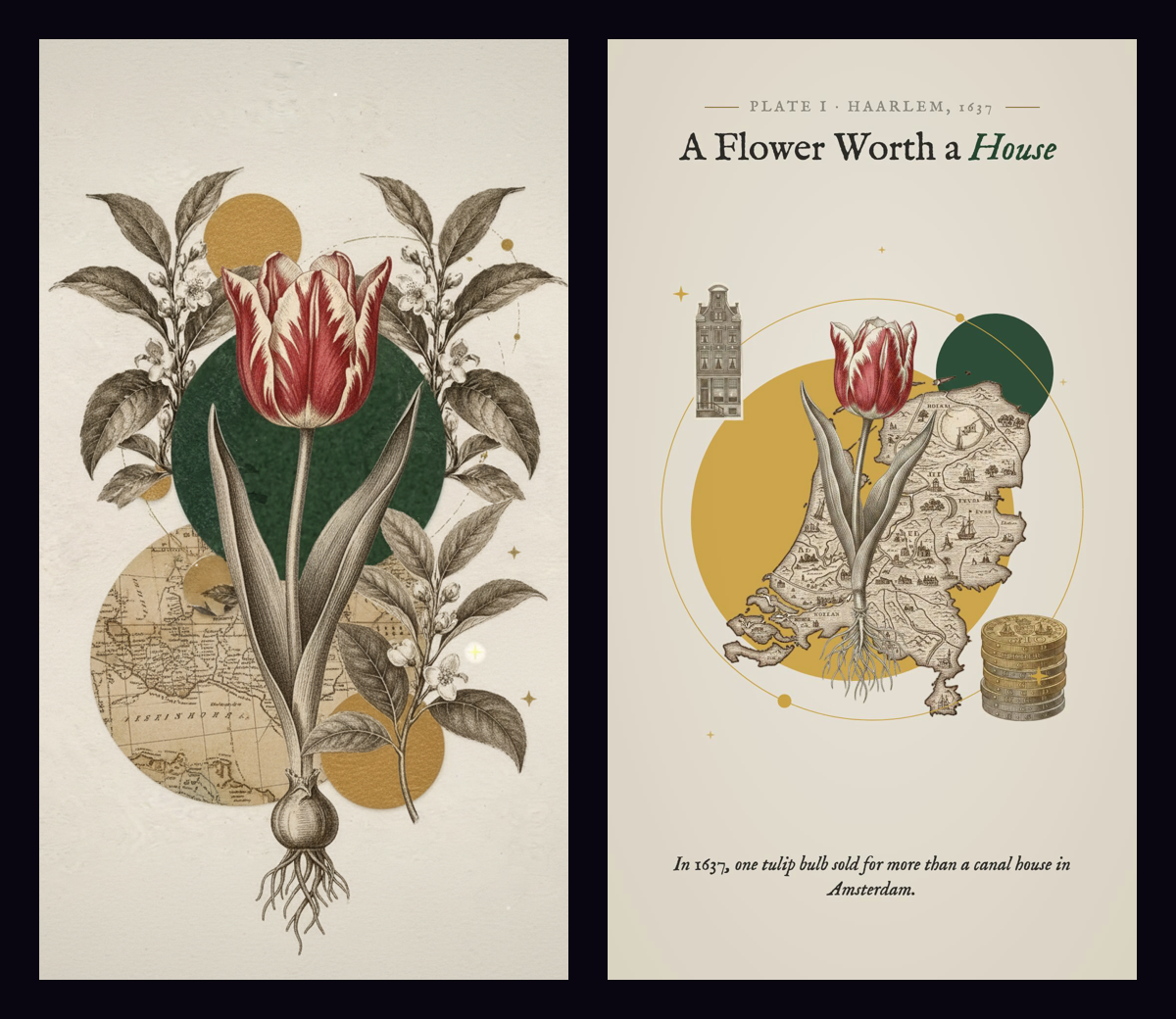
My first render had the hero too small against the circles, so the layout looked sparse next to the reference. The fix was three numbers in the composition: hero width 760 to 920 pixels, props 420 to 480, backdrop 860 to 1000. No images were regenerated. That is the practical payoff of the split: layout and motion changes cost a re-render, not new art. The stills pass when the hero is readable at phone size, the headline clears the art, the caption sits clear of the hero, and nothing touches the frame edges.
8.Step 6: Add Voice, Music and Sound
For the guide reel that explains this workflow, I wrote one voice line per section and generated each line as its own clip with ElevenLabs, using the James voice sped up to 1.1×. Separate clips make timing simple. Each section lasts as long as its clip plus about 0.7 seconds of air, with a minimum length so short lines still give the visuals time to land. The longest step line ran 5.67 seconds, the shortest 4.26, and the reel came out at 46.9 seconds.
The section lengths live in a small JSON file the composition imports. A script measures each clip and writes the frame counts, so changing a line means regenerating that one clip and re-rendering. Nothing is moved by hand. This is the timing file from the final render, in frames at 30 fps:
{"hook": 152, "s1": 158, "s2": 152, "s3": 170, "s4": 193, "s5": 151, "pay": 316, "end": 113}Check loudness before you trust a mix. The raw voice clips measured about -39 LUFS, far quieter than normal speech audio, and my first render was close to silent. Normalizing each clip to -16 LUFS fixed it, and the final mix measured -18.3 LUFS integrated with peaks at -2.9 dBFS:
Run
ffmpeg -i hook.mp3 -af loudnorm=I=-16:TP=-1.5:LRA=11 -ar 44100 hook_norm.mp3The music bed is a 126 BPM minimal tech house track, set at 0.1 under the voice and raised to 0.2 once the voice stops in the payoff. Sound effects are listed in the composition as file, frame and volume, and each one is placed on a visual event: a paper flip as each reference card drops, typing while a command types out, a soft pop as each cut-out tile appears, a thud as each layer stacks, a riser into the payoff and a boom on the cut. Because they are tied to the same frame numbers as the animation, they stay in sync when sections are re-timed. The mix passes when the voice is clear over everything, nothing clips, and the music is still audible once the voice ends.
9.Where This Workflow Breaks
The art can drift between scenes. Each cut-out is a separate request, so the merchant’s engraving can be finer than the tulip’s. Reference frames reduce this but do not remove it. When one part looks off, regenerate that part with tighter wording; do not regenerate the scene.
Background removal fails on thin, light details. Wisps of smoke, fine roots and white flower petals against white can get eaten or keep a fringe. Look at every cut-out on a dark background before rendering, and ask for a darker or more solid version of the subject when a part fails.
The layout is one template. The composition places the hero in the center, props at fixed spots and circles at fixed sizes. That suits an object-led collage, but a style built on full-bleed scenes or many small figures needs its own composition. In one Tulip Mania scene, the torn ledger backdrop sat completely behind the merchant and a circle and never showed, which is a placement problem only a look at the stills catches.
Costs scale with parts, not seconds. Each cut-out is one image call plus one background removal, so a scene with a hero, two props and a backdrop costs about $0.20 on fal.ai, whether it lasts three seconds or six. Voice, rendering and music are separate: rendering runs locally for free, and the voice clips for the guide reel were 596 characters, about $0.18 at my ElevenLabs estimate.